
Choosing the right process management tool depends on whether you need process mapping, governance, compliance control, workflow automation, or project management.
The best process management software helps organisations standardise work, reduce dependency on key people, improve compliance, control process changes, and keep operations consistent as they grow.
That matters even more for organisations with multiple teams, sites, departments, or regulatory requirements.
The challenge is that there are now dozens of tools claiming to be “process management software” when they are actually very different products.
Some are simple diagramming tools. Some are project management platforms. Some are low-code automation tools. Others are governance-first platforms built to control how work is documented, owned, approved, reviewed, and improved over time.
This guide compares the best process management software for different use cases, team sizes, and business requirements.
How we evaluated the software
We compared each platform based on its primary purpose, process mapping capabilities, ownership controls, approvals, version history, document management, reporting, automation and suitability for ongoing process governance.
We also considered how easily business teams can maintain processes after they have been mapped.
ProcessPro publishes this comparison and is included in the list. Product information was reviewed using publicly available information available in September 2026. Features and pricing may change, so confirm current details with each provider before making a decision.
What Is Process Management Software?
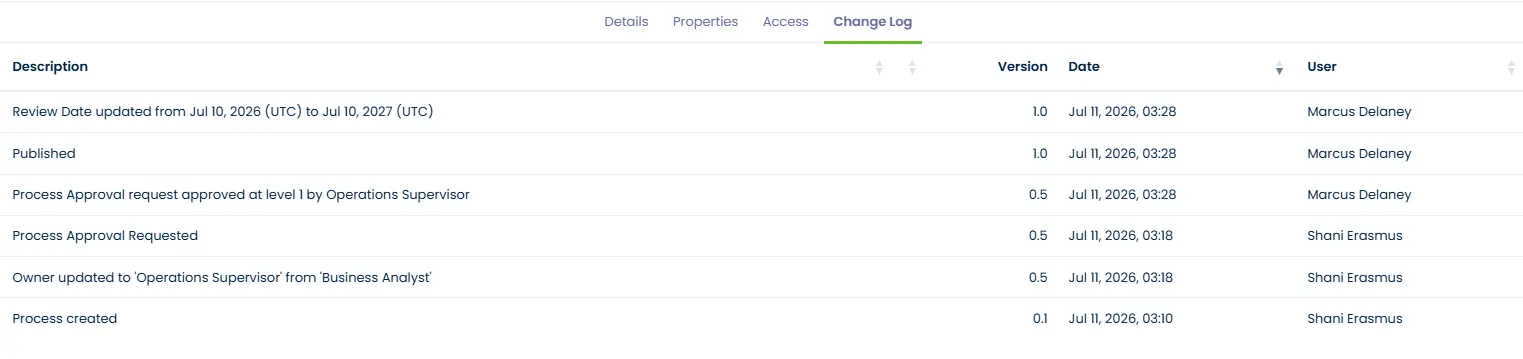
Process management software gives teams one place to map, document, approve and improve their processes, so everyone works from the current approved version. The best tools add governance on top: clear ownership, approval workflows, version history and a change log that shows who changed what and when.
10 Best Process Management Tools at a Glance
| Software | Best For | Key Strength | Process ownership and approvals | Version history and audit trail |
|---|---|---|---|---|
| ProcessPro | Governance-first process management | Ownership, approvals, version control, compliance | Built in: role-based ownership, RACI, approvals, review cycles | Built in: version history and change log |
| Nintex Process Manager | Enterprise process mapping | Large-scale process documentation | Built in: ownership, review and approval workflows | Built in: version control and change tracking |
| Kissflow | Workflow automation | Low-code process automation | Workflow approvals; limited process ownership | Limited |
| Monday.com | Team workflows | Flexible work management | Limited; not designed for process ownership | Limited |
| ClickUp | Task and project workflows | Team productivity and collaboration | Limited | Limited audit trails |
| Lucidchart | Process diagrams | Visual mapping and flowcharts | Limited | Limited |
| Microsoft Power Automate | Automation | Microsoft ecosystem workflows | Approval automation; limited process ownership | Not a focus |
| Bizagi | Enterprise BPM | BPMN modelling and automation | Automation-focused; technical to manage | Not a focus |
| Appian | Complex enterprise workflows | Low-code application development | Automation-focused, not process governance | Not a focus |
| Process Street | Workflow and procedure management | Recurring workflows, SOPs and checklists | Checklist approvals; limited ownership structure | Limited audit trail |
The right choice depends on what you need the software to do.
Choose ProcessPro when you need process mapping combined with ownership, approvals, review cycles, version history and controlled change.
Choose Kissflow, Microsoft Power Automate or Appian when workflow automation is the main requirement.
Choose Lucidchart when you mainly need to draw process diagrams.
Choose Process Street when you need recurring checklists and procedure execution.
Why Governance Matters in Process Management
One of the biggest reasons process initiatives fail is that organisations only document work without governing it.
They create diagrams and SOPs, but no one knows:
- Who owns them
- When they should be reviewed
- Which version is current
- Whether people are following them
- What changed since last time
That creates risk.
Different teams start doing the same process differently.
Managers answer the same questions repeatedly.
Knowledge stays with individuals instead of the business.
Processes drift over time.
When systems go down or key people leave, teams struggle to know how work should still get done.
Governance-first process management software solves that by giving you ownership, approvals, and control over your processes.
The 10 Best Process Management Tools Reviewed
1. ProcessPro
ProcessPro is best for organisations that need governance, ownership, compliance, and version control built into their process management software.
Unlike generic diagramming or project management tools, ProcessPro is designed to manage how work is documented, owned, approved, reviewed, and improved over time. Many organisations start with business process mapping before moving into ownership, approvals, and governance.
You can see how it works on the ProcessPro business process management software page.
It is particularly strong for organisations where process failure creates operational, compliance, quality, or audit risk.
That includes:
- Manufacturing
- Financial services
- Healthcare
- Utilities
- Multi-site operations
- Government and public sector organisations
- Quality, compliance, and risk teams
Key strengths
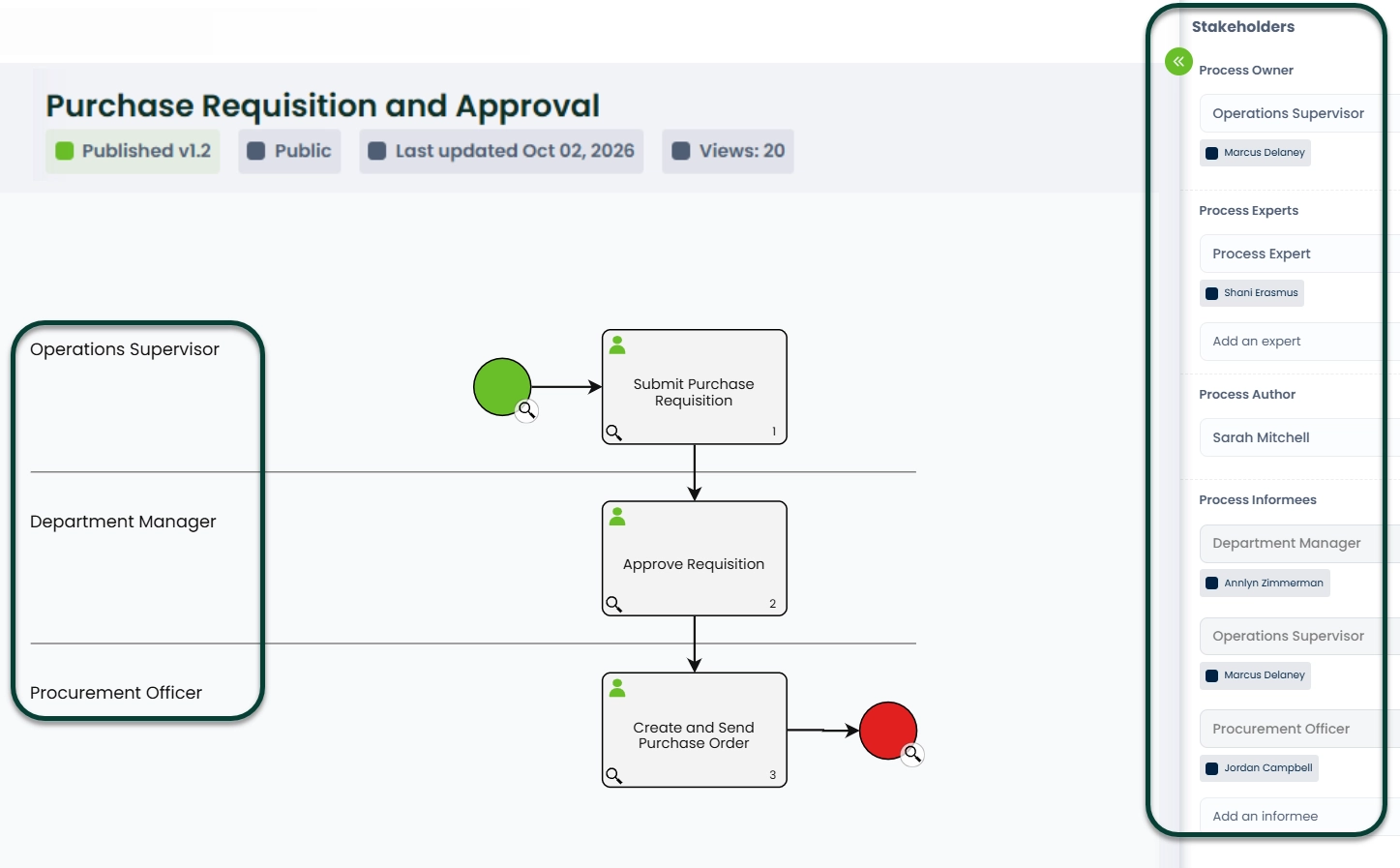
- Combines process mapping and governance in one platform
- Keeps processes owned, approved, current and audit-ready
- Designed for business users rather than technical process specialists
- Supports consistent ways of working across teams, sites and companies
- Turns scattered process knowledge into one controlled source of truth
Key Features
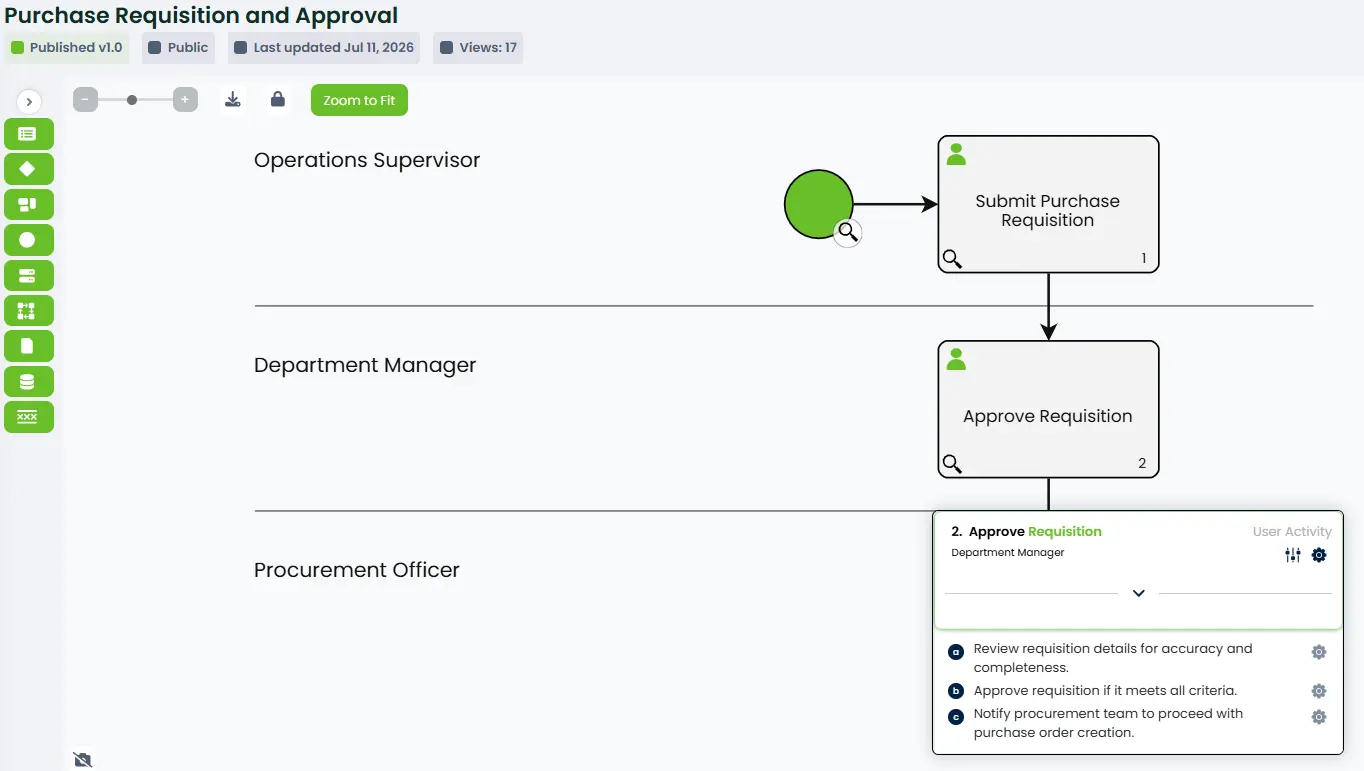
- Visual process mapping
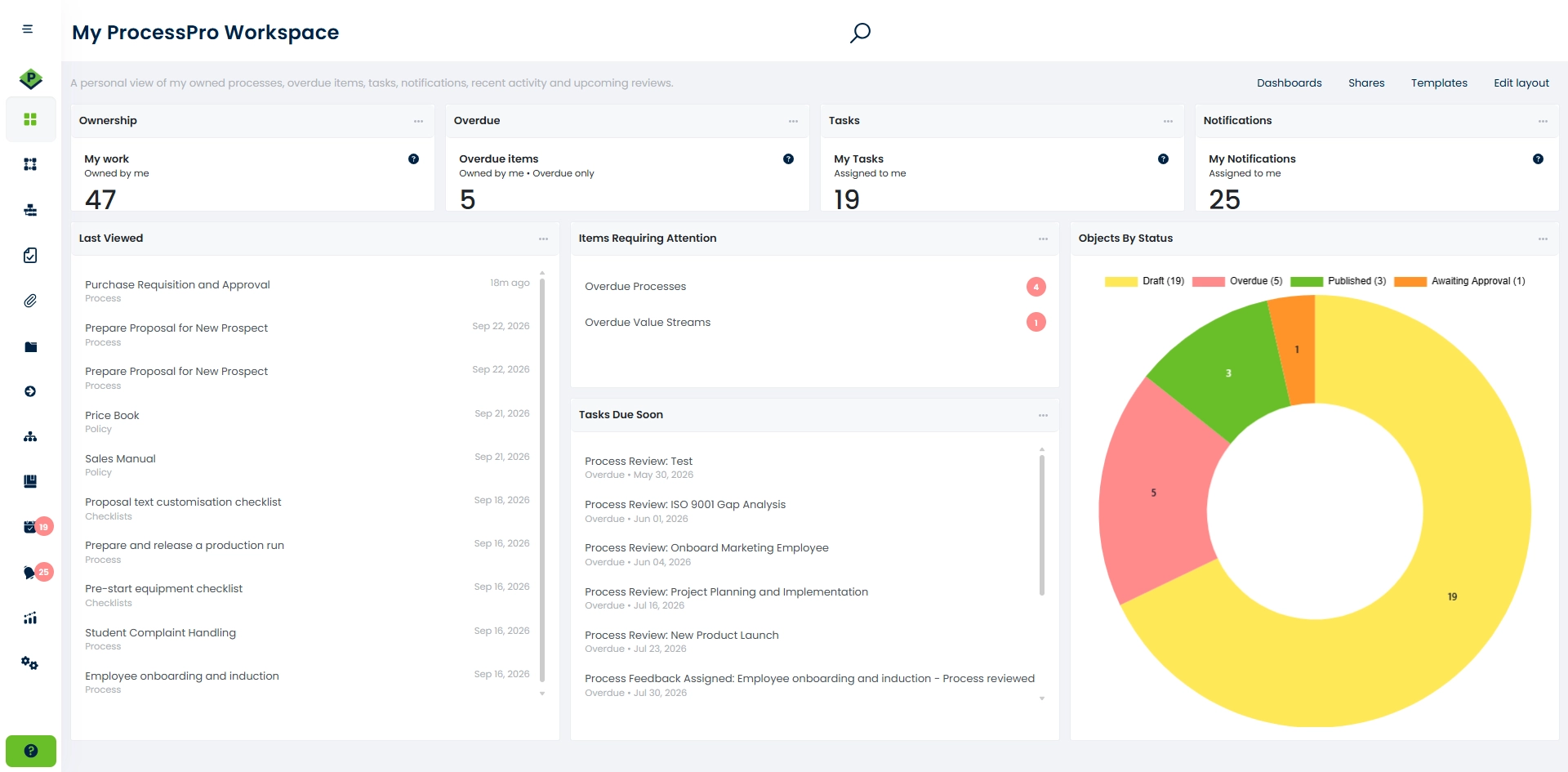
- Role-based process ownership
- Stakeholders and RACI responsibilities
- Process approvals
- Review cycles and reminders
- Published, draft, overdue and awaiting-approval statuses
- Version history and change records
- Managed documents linked to processes
- Reports and filters
- Multi-company process management
- SmartFlow AI-assisted process creation and analysis
View ProcessPro pricing and subscription options.
Best For
ProcessPro is best for organisations that need more than a flowchart.
If you need process ownership, approvals, version control, compliance, audit readiness, and a single source of truth for how work gets done, ProcessPro is one of the strongest options available.
Not best for
Small teams that only need basic flowcharts, personal task lists or simple project boards.
Pros
- Strong governance and compliance controls
- Designed for business users, not just technical teams
- Keeps one current approved version of every process
- Makes it easy to see who owns what
- Strong audit readiness and change history
- Supports business continuity when staff leave
- Combines process mapping, document management, ownership, and approvals in one platform
Cons
- More structured than lightweight diagramming tools
- Better suited to organisations with formal process requirements than small startup teams
See ProcessPro in action
Watch a two-minute walkthrough of process governance in ProcessPro, then see the screens your team works in every day.
ProcessPro in practice
ProcessPro is used by organisations in manufacturing, banking, education, healthcare, utilities and local government.
Snowy Monaro Regional Council eliminated 1,000 hours of wasted effort annually through process mapping and improvement. Brookville Equipment used ProcessPro to standardise processes across departments, while Valley Bank cut audit preparation time by 40% and saw 50% fewer process risk incidents.
See how ProcessPro compares in practice
Use your own process during the trial to test mapping, ownership, approvals, review cycles and version history with your team.
2. Nintex Process Manager
Nintex Process Manager is used for process mapping and documentation.
It is strong for organisations that want to document processes at scale, especially across multiple departments or business units.
See the full ProcessPro vs Nintex Process Manager comparison.
Best for
Large organisations that need to document, manage and maintain processes across multiple departments or business units.
Key strengths
- Strong process mapping and documentation
- Centralised process repository
- Clear process ownership and responsibilities
- Process review and approval workflows
- Version control and change tracking
- Useful for large organisations with multiple departments
- Integrates with the broader Nintex automation platform
Not best for
Small teams looking for a lightweight process tool or organisations primarily focused on workflow automation.
Pros
- Strong process mapping capability
- Good enterprise scalability
- Widely recognised brand
- Good process repository structure
Cons
- Can become complex to manage at scale
- Often requires additional products for broader workflow automation
- Less focused on governance and role-based accountability than ProcessPro
3. Kissflow
Kissflow is best known for workflow automation and low-code business applications.
It is better suited to organisations focused on automating repetitive workflows rather than governing documented business processes.
Best for
Organisations that want to build and automate workflows, approval processes and low-code business applications.
Key strengths
- User-friendly low-code workflow builder
- Strong workflow automation and approvals
- Custom forms and business applications
- Suitable for non-technical teams
- Supports integrations with other business systems
Not best for
Organisations that mainly need a governed process repository with detailed process ownership and version control.
Pros
- Low-code workflow automation
- User-friendly interface
- Strong forms and approvals
Cons
- More workflow-focused than process governance-focused
- Less suited to formal process documentation and compliance management
4. Monday.com
Monday.com is a flexible work management tool used for projects, tasks, and team collaboration.
Some organisations use it to manage workflows, but it is not a dedicated process management platform.
Best for
Teams that need a flexible platform for managing projects, tasks and everyday workflows.
Key strengths
- Highly customisable boards and workflows
- Strong task and project visibility
- Easy team collaboration
- Broad range of templates
- Integrates with popular business tools
- Suitable for teams of different sizes
Not best for
Formal process governance, controlled process documentation and audit-ready process management.
Pros
- Easy to use
- Flexible workflows and boards
- Good for team visibility
Cons
- Limited process governance
- Not designed for formal process ownership, version control, or compliance
- Better for work management than process management
5. ClickUp
ClickUp is another flexible platform often used for tasks, projects, and internal team workflows.
Best for
Teams that want to manage projects, tasks, documents and everyday workflows in one flexible platform.
Key strengths
- Strong task and project management
- Customisable workflows and dashboards
- Built-in documents and team collaboration
- Multiple views, including lists, boards and timelines
- Workflow automation for routine actions
- Wide range of integrations and templates
Not best for
Organisations that need formal process approvals, process version control and a controlled process repository.
Pros
- Highly flexible
- Strong task management
- Good collaboration features
Cons
- Can become messy without structure
- Not designed for formal process governance
- Limited audit trails and process ownership functionality
6. Lucidchart
Lucidchart is one of the most widely used diagramming tools.
It is good for creating process maps, flowcharts, and visual workflows.
Best for
Teams that need to create process maps, flowcharts and other visual diagrams quickly.
Key strengths
- Easy-to-use visual diagramming
- Large library of shapes and templates
- Real-time team collaboration
- Supports process maps, flowcharts and org charts
- Integrates with popular workplace tools
- Useful for workshops and early-stage process design
Not best for
Ongoing process ownership, review cycles, approvals and governed process maintenance.
Pros
- Easy to create diagrams
- Good for workshops and process mapping sessions
- Familiar interface
Cons
- Primarily a diagramming tool
- Limited governance, ownership, approvals, and version control
- Not ideal as a long-term process repository
7. Microsoft Power Automate
Microsoft Power Automate is best for organisations already invested in the Microsoft ecosystem.
It focuses on workflow automation rather than process documentation and governance.
Best for
Organisations using Microsoft 365 that want to automate repetitive tasks, approvals and data flows between applications.
Key strengths
- Strong integration with Microsoft 365 and Dynamics 365
- Large library of connectors
- Cloud and desktop automation
- Low-code workflow builder
- Approval and notification automation
- Suitable for repetitive, rules-based workflows
Not best for
Teams looking for a business-friendly process repository and visual process governance platform.
Pros
- Strong Microsoft integration
- Good for automation between systems
- Useful for repetitive tasks and notifications
Cons
- Not a dedicated process management platform
- More technical to set up
- Limited process ownership and governance features
8. Bizagi
Bizagi is a BPM platform used by larger organisations for process modelling and automation.
Best for
Large organisations that need process modelling, workflow automation and business process management across departments.
Key strengths
- Strong process modelling and documentation tools
- Low-code workflow and application development
- Supports complex processes and business rules
- Process monitoring and performance reporting
- Suitable for enterprise-wide process automation
Not best for
Teams that need a simple platform that business users can manage without BPMN or technical expertise.
Pros
- Strong BPMN modelling
- Enterprise-grade automation
- Good for complex workflows
Cons
- Can be technical and resource-intensive
- Better for enterprise IT teams than business users
9. Appian
Appian is a powerful low-code automation platform.
Best for
Large organisations that need to automate complex processes and connect workflows across multiple systems.
Key strengths
- Low-code application and workflow development
- Strong process automation capabilities
- Supports complex business rules and case management
- Connects data and systems across the organisation
- Process monitoring and reporting tools
Not best for
Organisations that only need process mapping, process documentation and straightforward governance.
Pros
- Strong low-code capabilities
- Enterprise automation
- Good for complex business applications
Cons
- More focused on application development than process governance
- Often requires technical support and specialist resources
10. Process Street
Process Street is popular for recurring procedures, checklists, and SOP execution.
Best for
Teams that need to document, manage and automate recurring procedures, checklists and approvals.
Key strengths
- Simple checklist-based process management
- No-code workflow builder
- Forms, approvals and conditional logic
- Workflow scheduling and task assignments
- Integrations with other business applications
Not best for
Complex visual process mapping, connected end-to-end processes and enterprise process governance.
Pros
- Easy to use
- Good for recurring checklists
- Useful for standard operating procedures
Cons
- Less suitable for enterprise process governance
- Limited process mapping capability
- Limited audit and ownership structure compared to ProcessPro
Also worth considering: Flowingly
Flowingly is a no-code process and workflow platform from New Zealand, popular with local councils in New Zealand and Australia. It brings AI-generated SOPs, process maps, digital forms and workflow automation together in one tool.
See the full ProcessPro vs Flowingly comparison.
Best for
Teams that want process maps, SOPs, forms and no-code workflow automation in one place, especially in local government.
Key strengths
- No-code workflow and digital forms builder
- AI process maps and SOPs from screen recordings, text, images or CSV files
- Publish approvals, version history and process review reminders
- Published pricing
Not best for
Organisations that need change acknowledgements, several companies in one account, business continuity reporting or full BPMN maps.
Pros
- Easy for non-specialists to build workflows
- Maps, SOPs and workflows in one platform
- Transparent pricing
Cons
- Plans start with a set number of users (10 or 20)
- Mapping is simplified and only loosely based on BPMN
- Microsoft Teams messages rely on the Power Automate add-on
How to Choose the Best Process Management Software
The best software depends on what your organisation is trying to achieve.
If you only need basic diagrams, a diagramming tool may be enough.
If you need workflow automation, you may need a low-code or automation platform.
If you need to standardise work across teams, control changes, improve compliance, and reduce operational risk, you need a governance-first process management platform.
Ask these questions before choosing a platform:
- Do you need process mapping, workflow automation, or both?
- Do you need formal approvals and version control?
- Do you need role-based ownership?
- Do you need linked policies, forms, and documents?
- Do you need audit history and compliance reporting?
- Will multiple teams or sites use the platform?
- Do you need onboarding, training, or business continuity support?
- Do you need AI-assisted process creation?
Not sure how to answer those questions for your organisation yet?
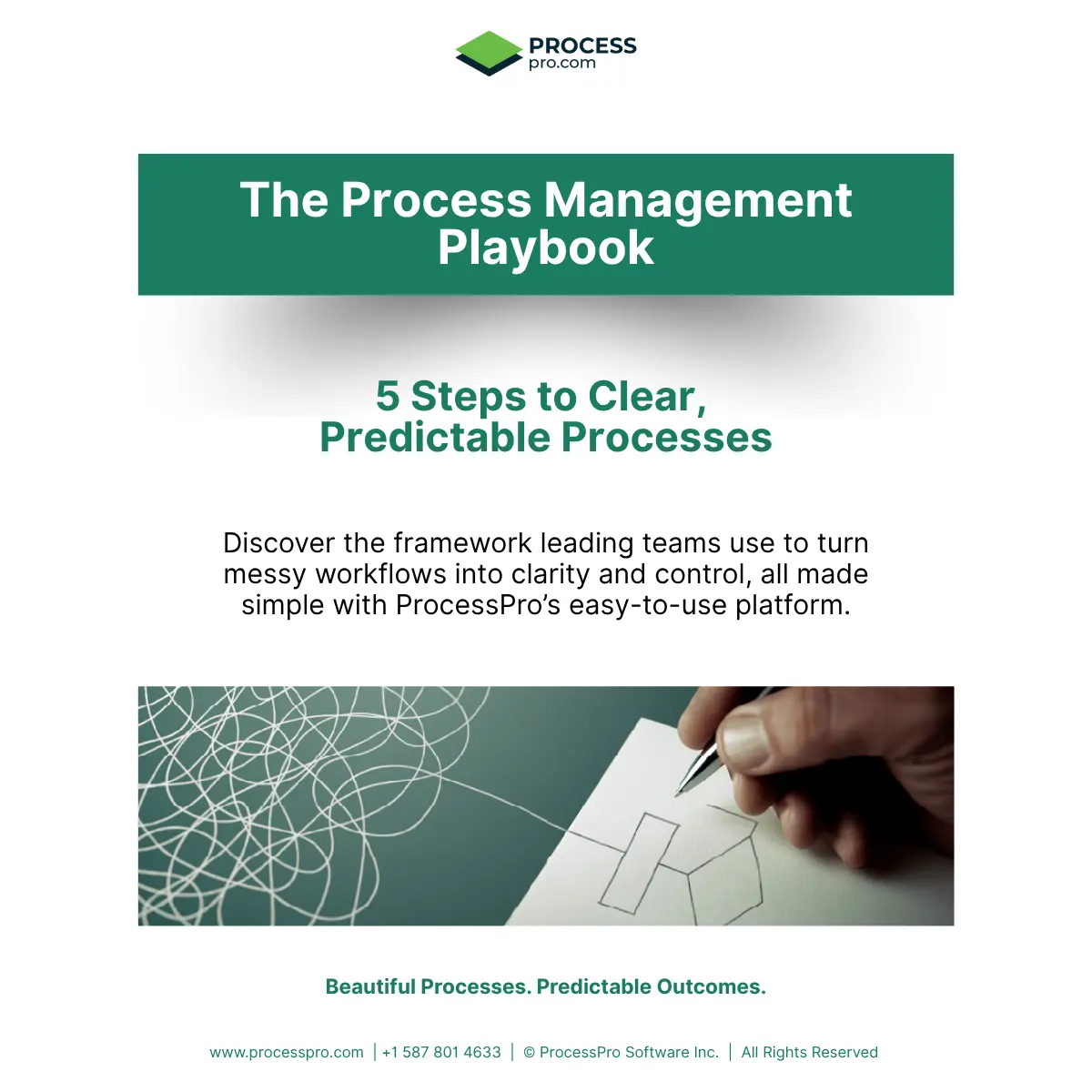
The Process Management Playbook walks you through five steps to clear, predictable processes: visualise, standardise, govern, automate and improve. Use it to work out what your processes need before you choose a platform.
Process Mapping Software vs Process Management Software
Many organisations confuse process mapping software with process management software.
Process mapping software is primarily used to draw diagrams.
Process management software goes further.
It helps organisations:
- Govern changes
- Control versions
- Assign owners
- Link documents
- Review processes regularly
- Manage approvals
- Track history
- Keep a single source of truth
That difference becomes important as organisations grow.
A diagram alone does not tell people:
- Which version is current
- Who approved it
- What changed
- Who owns it
- Which supporting documents apply
- Whether people are following it
Best Process Management Software by Use Case
| Use case | Recommended tools | Why |
|---|---|---|
| Compliance and audit readiness | ProcessPro, Nintex Process Manager, Bizagi, Signavio | Stronger process control, ownership, history and governance capabilities |
| Workflow automation | Microsoft Power Automate, Kissflow, Appian, Pipefy | Designed to automate tasks, approvals and system-driven workflows |
| SOPs and procedures | ProcessPro, Process Street, Trainual | Suitable for documented procedures, responsibilities and controlled operational guidance |
| Operations teams | ProcessPro, Nintex Process Manager, Monday.com, Pipefy | Supports operational visibility, standardisation or workflow coordination |
| Enterprise BPM | Bizagi, Appian, Signavio, Nintex Process Manager | Designed for large-scale process modelling, automation or enterprise transformation |
| Visual process mapping | Lucidchart, Miro, Visio, ProcessPro | Supports visual process creation, with different levels of ongoing management and governance |
Frequently Asked Questions
What is the best process management software?
The best process management software depends on your business requirements.
For organisations focused on governance, compliance, ownership, approvals, and version control, ProcessPro is one of the strongest options.
For workflow automation, Microsoft Power Automate and Kissflow are strong options.
For simple diagramming, Lucidchart and Miro are popular choices.
What is the difference between BPM software and workflow software?
Workflow software is usually focused on automating tasks and approvals.
BPM software is broader.
It includes process mapping, ownership, governance, version control, monitoring, reporting, and improvement.
What is the best process management software for compliance?
ProcessPro, Nintex Process Manager, Bizagi, and Signavio are among the strongest options for organisations that need process ownership, version control, audit history, and compliance support.
What is the best process management software for SOPs?
ProcessPro and Process Street are strong choices for SOPs because they support structured procedures, linked documents, process ownership, and approvals.
How long does a ProcessPro demo take?
A personalised ProcessPro demo takes around 45 minutes, and extra time can be arranged for questions or a deeper discussion. Book a Demo and the ProcessPro team will contact you by email to arrange a time.
Can we import existing processes from Visio or Excel?
Yes. ProcessPro can import process maps from Microsoft Visio and import processes from Excel, so you do not have to start from scratch.
What is the best process management software for operations teams?
Operations teams usually need more than workflow automation.
They need visibility into how work gets done, who owns it, what changed, and whether teams are following the same process.
That is where governance-first platforms like ProcessPro are particularly strong.
Final Thoughts
The best process management software is not always the one with the most features.
It is the one that best fits how your organisation works.
If your business only needs basic workflow automation or diagramming, a lightweight tool may be enough.
But if your organisation needs process ownership, compliance, audit readiness, version control, and operational consistency, you need something more structured.
That is where ProcessPro stands out.
It gives organisations one place to map, own, approve, review, and improve how work gets done.
For organisations where process failure creates real operational and compliance risk, that makes a major difference.
See if ProcessPro is right for your organisation
See how ProcessPro handles ownership, approvals, reviews and version control with your own processes. Book a personalised demo with our team, or start a free 30-day trial with up to five users and no credit card required.
Prefer to explore on your own? Start a free trial.

James Ross
James Ross is the CEO of ProcessPro. He works with organisations to make their processes easier to manage, review and improve. His focus is on giving teams clear ownership of their processes and a reliable way to keep them up to date.
Share this article