
Features › Activity Tasks
Process mapping activity tasks
Show your team how to complete each activity
Turn a broad process step into clear actions and checks, so people know what to do and in what order.
Activity tasks add detailed instructions beneath the relevant step in ProcessPro. Your team can follow the work involved without relying on the activity title alone.
Make everyday know-how available to your team
An experienced colleague may know everything involved in preparing equipment or delivering a new employee’s induction. Someone covering their work may only have the process map and a short activity name.
ProcessPro gives you a place to record the actions and checks behind each step. Your team can follow the agreed instructions, so a new employee’s preparation does not depend on who happens to be available.
Make it clear what completing an activity involves
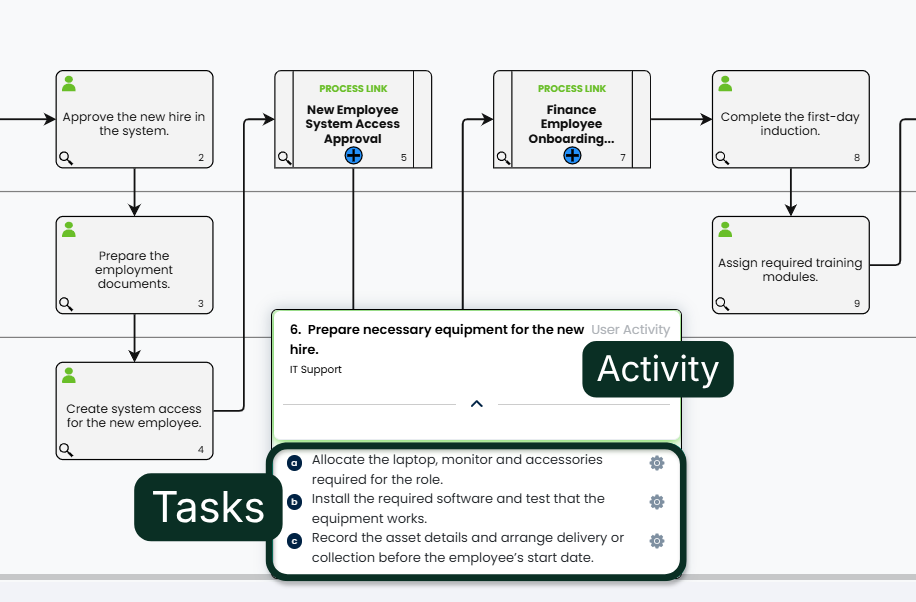
Break an activity into individual actions and checks. Tasks appear beneath the activity in the diagram content, keeping detailed instructions connected to the step they explain.
For example, “Prepare necessary equipment for the new hire” could include:
- Allocate the laptop, monitor and accessories required for the role.
- Install the required software and test that the equipment works.
- Record the asset details and arrange delivery or collection before the employee’s start date.
IT Support can see what needs to be prepared, tested and recorded before handing over the equipment.
Build task instructions from the information you have
Write the instructions yourself, use AI to prepare a first draft, or collect input from people who know the work.
Write tasks from your team’s knowledge
Document the actions and checks your team follows. Capture the details that someone unfamiliar with the activity would need, so the instructions are useful beyond the person who wrote them.
Generate a first draft with AI
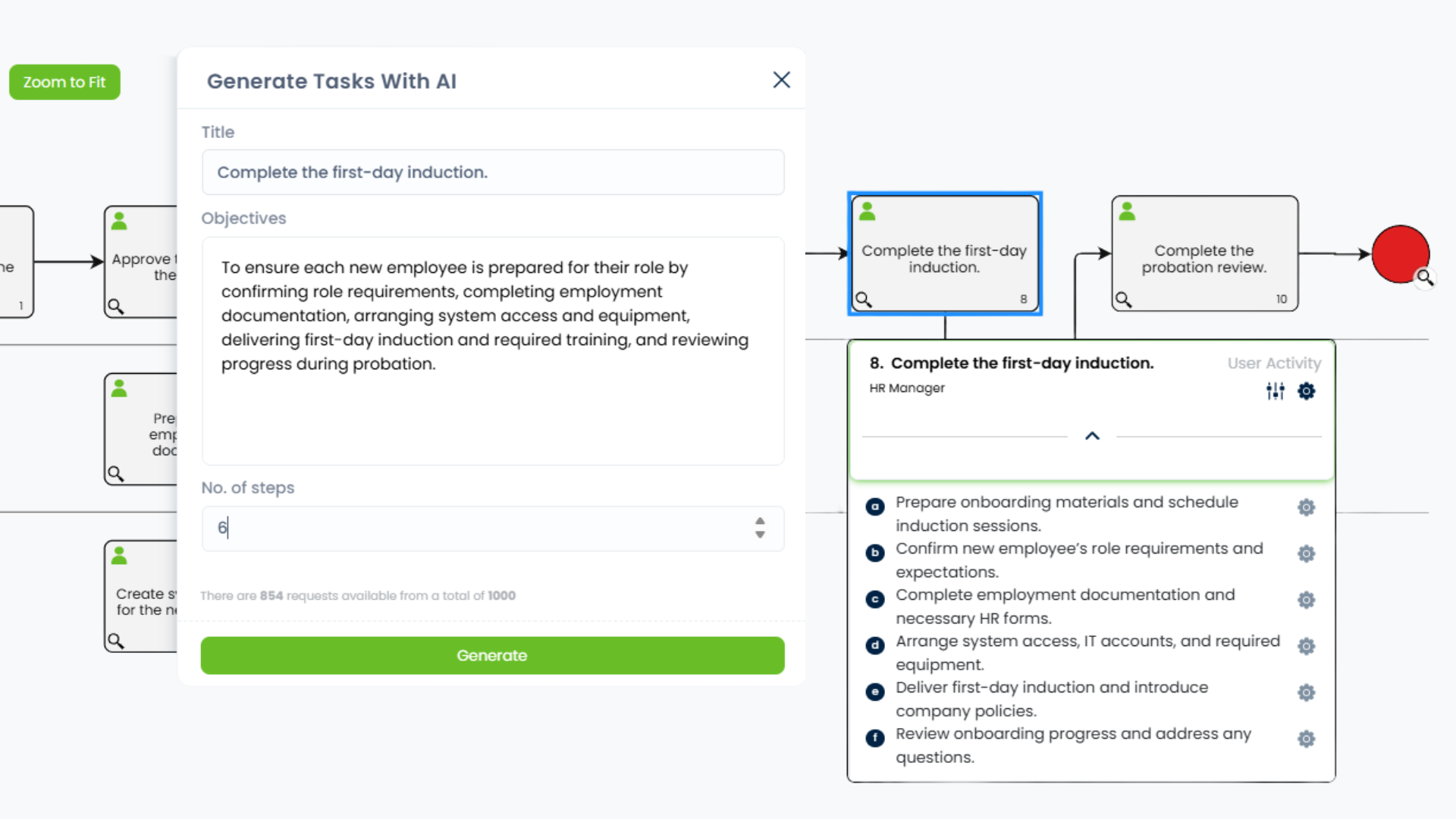
Generate suggested tasks using the activity name and process objectives. Choose how many steps to generate, then review and edit the suggestions to reflect how your team works.
This gives process authors a starting point when the activity has been mapped but the supporting instructions still need to be written.
Collect details from the people doing the work
Use Request Details to gather input from internal colleagues or external contributors. Their submitted information is captured as tasks within the relevant activity, reducing the need to copy responses into the process yourself.
Keep instructions in a useful order
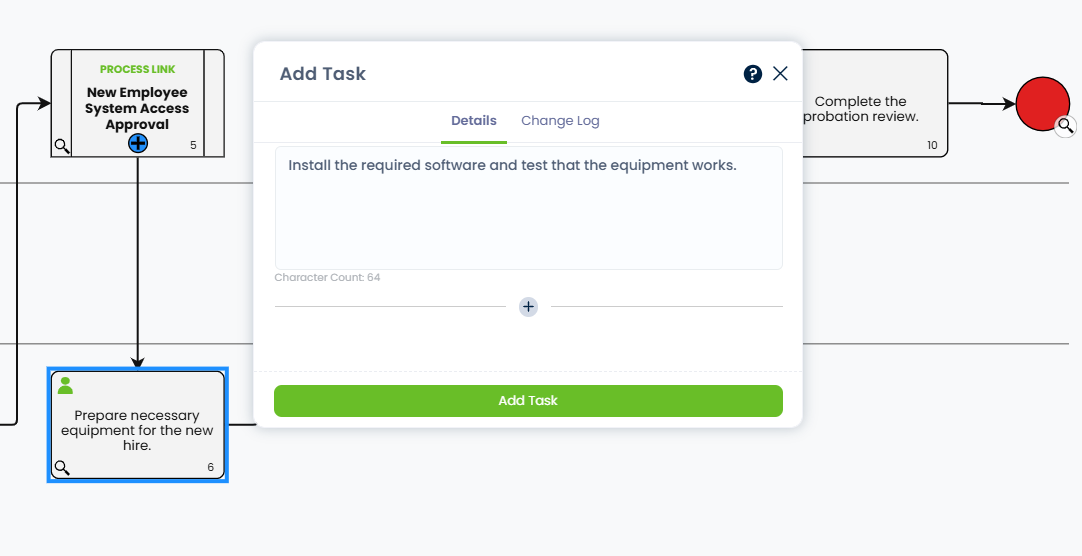
Arrange tasks in the sequence people need to follow. When the way you work changes, you can revise the wording, add missing actions, remove outdated instructions or reorder the tasks.
EXAMPLE
For example, place software installation and equipment testing before delivery or collection. The task list makes the sequence clear, helping your team prepare working equipment before the new employee starts.
Tasks can also be added to decisions and events. For process links, the tasks represent the activities within the linked process.
Generate a first draft of activity tasks
Use the activity name and process objectives to generate suggested tasks. This example shows six suggestions for the “Complete the first-day induction” activity. Review and edit the draft to match your working practices and remove anything already covered elsewhere in the process.
Keep task instructions connected to the wider process
Use Activities to show who is responsible for the step, with tasks describing the actions involved.
Add notes for exceptions and supporting attachments where people need further guidance. This helps your team understand both the routine work and what to do when a situation needs more attention.
Use Publish with Approval to have changes to process instructions checked before publication. Refer to process history when you need to review an earlier version of the process.
Give your team instructions they can work from
Bring the actions and checks behind each activity into ProcessPro, so people have practical guidance when they need to carry out the work.