
ProcessPro Works With Your ERP System
Your ERP manages transactions. ProcessPro manages the process around them. Map, standardise, and govern the workflows around your ERP system so teams follow the right steps.
- Works with SAP, Oracle, Dynamics & more
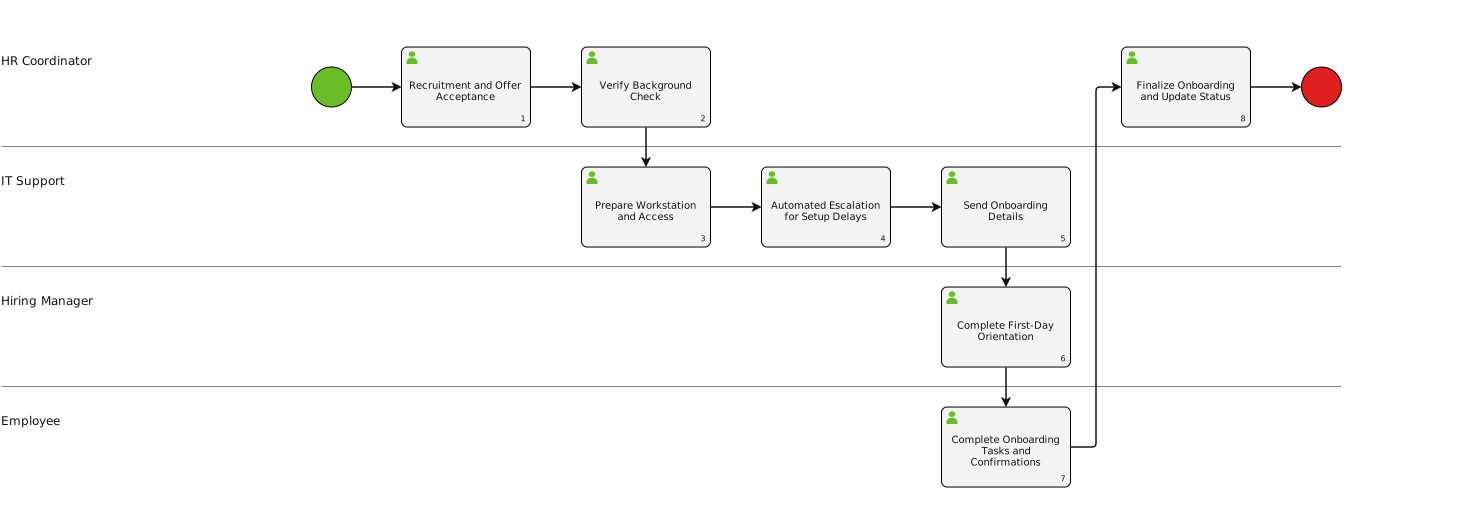
Process Governance
One source of truth
ProcessPro Is Not An ERP System
ERP systems manage transactions. ProcessPro manages how work gets done. Your ERP handles invoices, payroll, inventory, but it doesn’t always make clear:
Understanding The Difference
Who owns each workflow
Clear ownership and accountability for every process step
Which approvals are required
Defined approval chains that everyone understands
What documents are needed
Required documentation at each process stage
What happens with exceptions
Documented exception handling procedures
Which version is current
Version control so teams always use the latest process
How changes are communicated
Controlled change management and communication
ProcessPro gives your organisation one source of truth for how work should happen, before, during, and after actions are completed in your ERP system.
ERP Software vs Process Management
They’re often compared as if they do the same job. They don’t. Your ERP tells you what was done. ProcessPro helps your team follow how it should be done.
Side By Side
- ERP Systems Manage
- Transactions & business data
- Inventory & procurement records
- Payroll & finance records
- Customer records
- Operational functions & tracking
- ProcessPro Manages
- How work gets done
- Who owns each process
- Which approvals are needed
- How changes are controlled
- How teams stay aligned
ProcessPro works alongside ERP systems. It gives your organisation one clear, controlled way of working around the systems you already use.
Different teams follow different processes
No standardised way of working across the organisation
People rely on tribal knowledge
Critical information locked in people's heads
Staff use spreadsheets and email outside the ERP
Workarounds undermine the system's value
The Real Challenge
Why ERP Projects Often Struggle
Many ERP projects fail because software is expected to fix process problems. But software cannot fix unclear ownership, inconsistent workflows, undocumented steps, or teams working in different ways.
- ProcessPro Helps By
- Standardising how work gets done
- Making ERP systems easier to use and adopt
- Documenting processes for onboarding
- Making approvals clearer for everyone
- Creating audit trails auditors can follow
- Scaling operations without losing consistency
Common ERP-Related Workflows
ProcessPro helps manage the processes that sit around your ERP transactions
Use Cases
Procurement & Purchasing
Map the steps, approvals, supporting documents, and responsibilities behind purchase orders, supplier onboarding, and spend approvals.
- Purchase order workflows
- Supplier management
- Spend approval chains
Finance & Accounts Payable
Create clear workflows for invoice approvals, expense claims, month-end reporting, payment approvals, and reconciliations.
- Invoice approval workflows
- Month-end processes
- Expense claim handling
HR & Employee Onboarding
Show how onboarding, leave requests, training, policy sign-off, and employee changes should happen across teams.
- New starter onboarding
- Leave request workflows
- Training & compliance
Quality & Compliance
Keep controlled, audit-ready processes for non-conformance reporting, CAPAs, policy reviews, quality checks, and document control.
- CAPA management
- Document control
- Audit preparation
Operations & Service Delivery
Standardise how teams handle customer onboarding, job scheduling, service delivery, complaints, and internal requests.
- Customer onboarding
- Service delivery SOPs
- Complaint handling
Makes ERP Systems Easier To Use
When processes are unclear, teams stop trusting the ERP. They create workarounds. ProcessPro gives teams a clear, visual way to understand what they need to do.
Works Alongside Your ERP System
You don’t need to replace your ERP system. You need to make the work around it more consistent, controlled, and visible.
Compatibility
- SAP
- Oracle NetSuite
- Microsoft Dynamics
- MYOB
- Pronto
- Infor
- Epicor
- Acumatica
- Sage
- Xero
What You Can Expect From ProcessPro
- Standardise work across teams
- Create stronger audit trails
- Scale without losing consistency
- Reduce dependency on key people
- Reduce workarounds outside ERP
- Support compliance requirements
- Improve ERP adoption
- Improve onboarding & training
- Keep documentation current
Is ProcessPro an ERP system?
No. ProcessPro is a business process management platform. ERP systems manage transactions and business data. ProcessPro manages the workflows, approvals, ownership, and documentation around those transactions.
Does ProcessPro replace ERP software?
No. ProcessPro works alongside your ERP system. It helps you standardise and govern the processes that sit around the ERP.
Can ProcessPro integrate with ERP systems?
Yes. ProcessPro can work alongside ERP systems and other business tools so organisations have one source of truth for how work gets done.
What is the difference between ERP software and process management software?
ERP software manages operational data and transactions. Process management software helps teams understand, document, improve, and govern how work should happen.
Can ProcessPro help improve ERP adoption?
Yes. Many ERP adoption problems are process problems. When people do not understand the workflow, ownership, approvals, or correct way to complete a task, adoption suffers. ProcessPro makes those workflows easier to follow and easier to keep current.
FAQ
Frequently Asked Questions
Your ERP Manages Transactions.
ProcessPro Manages The Process Around Them.
If your teams are relying on spreadsheets, outdated SOPs, unclear approvals, or tribal knowledge around your ERP system, ProcessPro can help.