
A process in ProcessPro represents a structured workflow that documents how work is performed within your organisation, forming the foundation of effective business process mapping across teams. Processes can include activities, roles, documents, risks, controls, and automation, and can exist in Current State and Future State versions.
This guide walks you through how to create a process map with ProcessPro, from defining the process to publishing it for use across the organisation.
Who this guide is for
This guide is intended for process authors, administrators, and teams responsible for documenting, managing, and governing operational processes.
See process mapping in action
While this guide explains the concepts behind building a process map in ProcessPro, seeing the platform in action makes it easier to understand how processes, roles, documents, and automation work together. A guided demo shows how real processes are created, managed, and used across teams, so you can assess how ProcessPro fits your organisation’s way of working.
Quick Summary: This guide explains how to create a process map in ProcessPro, from defining the process and building activities to assigning roles, attaching documents, and publishing the process for execution across your organisation.
Step-by-step: Create a new process
1. Navigate to Processes
Start by opening the ProcessPro Dashboard where all existing processes are managed.
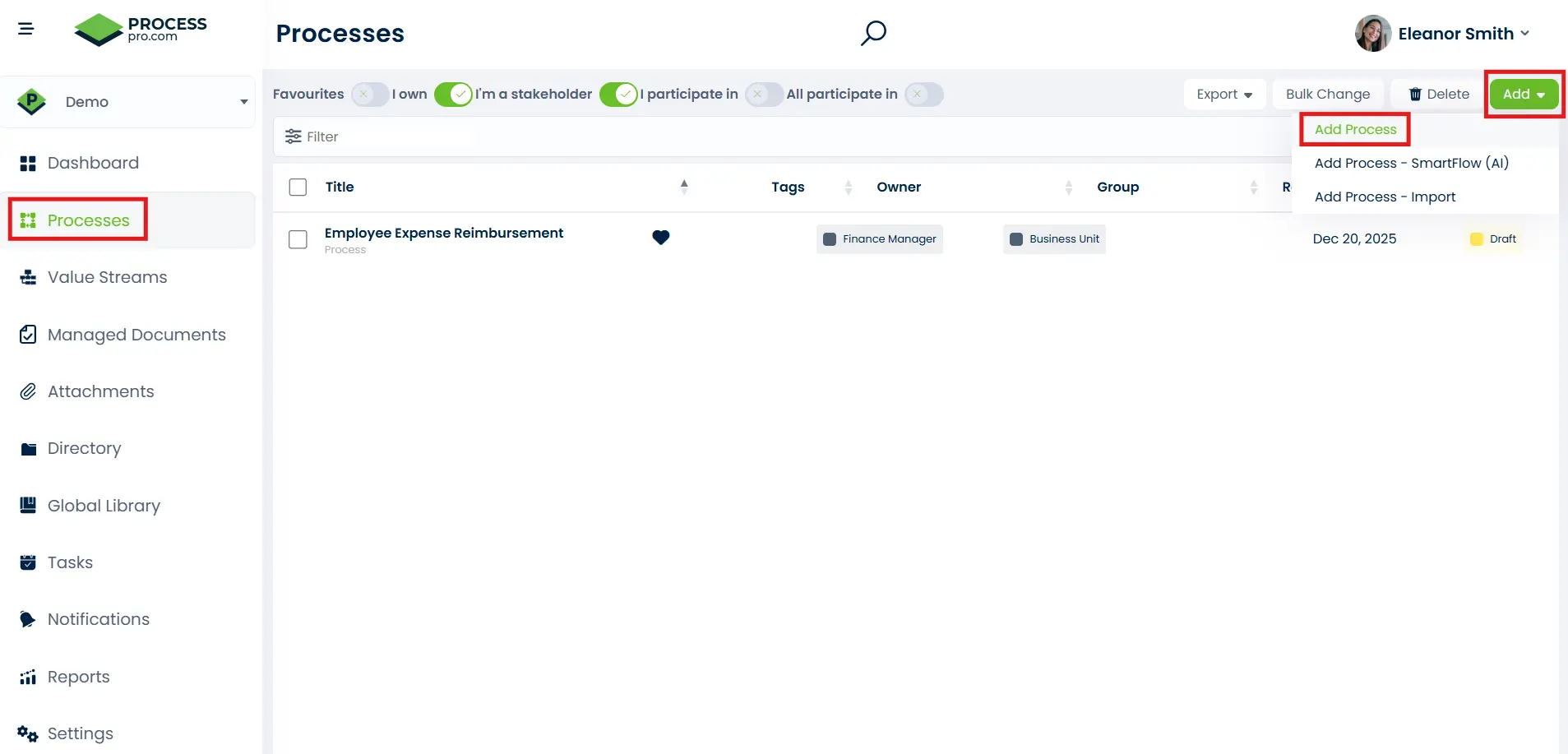
From the main navigation menu:
- Select Processes
- Click Add
- Click Add Process
2. Enter Basic Process Details
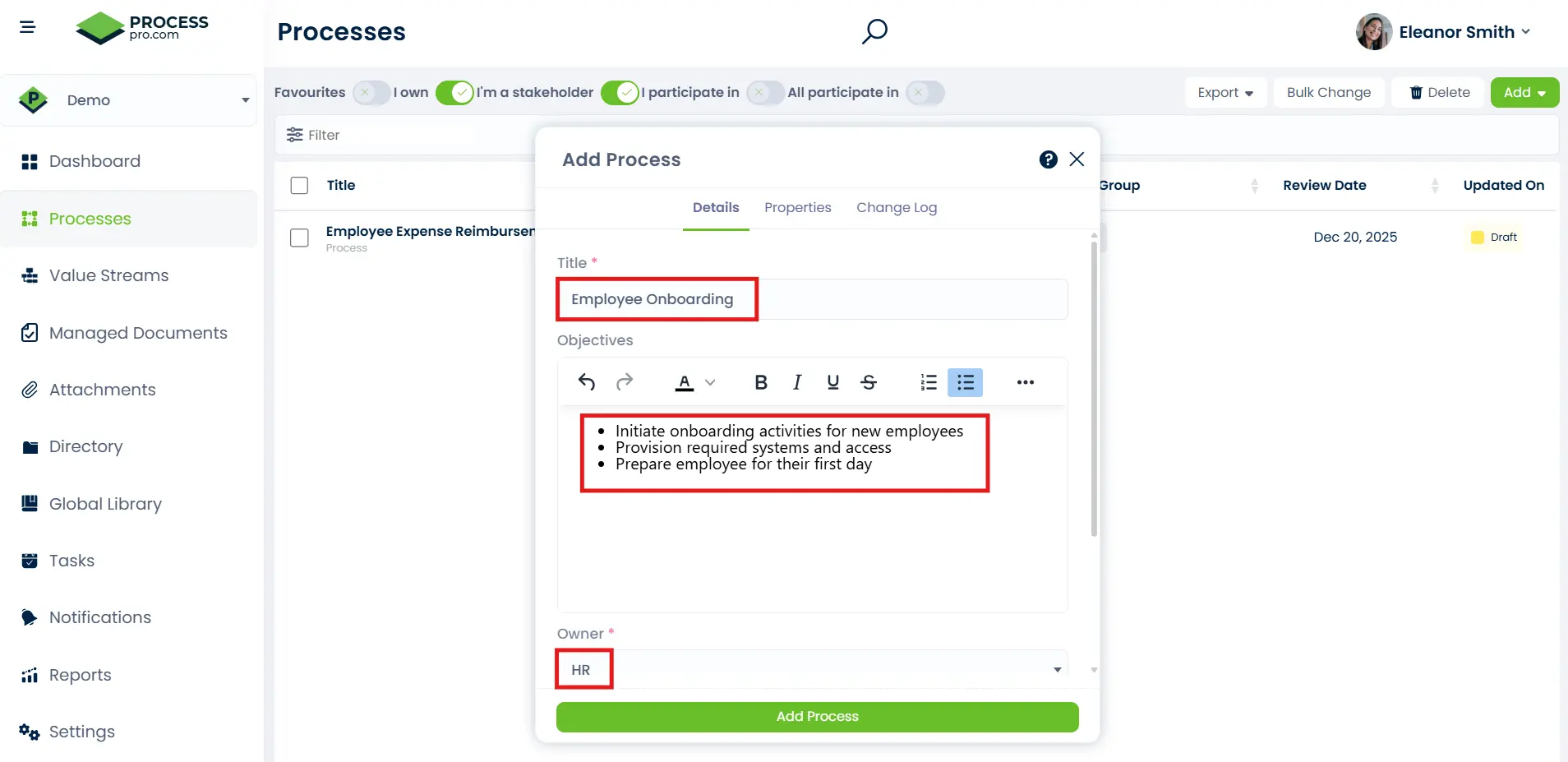
You will be prompted to capture the following information:
- Process Title – Clear, descriptive title
- Objectives – The mission, purpose, or goals or standard that is being achieved
- Owner – Primary accountable person of the process
- Group – identifies the specific team or division responsible for owning and maintaining the process
Click Add Process to create the process shell.
3. Build the Activities
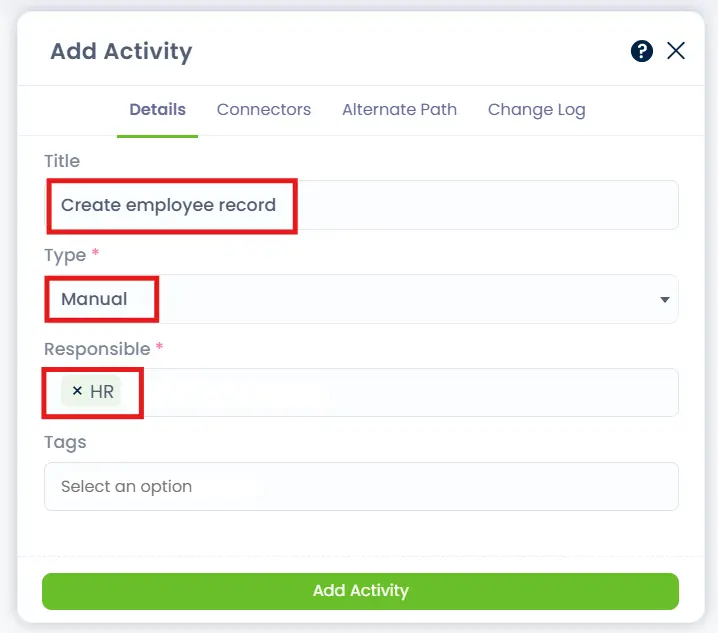
Once the process is created, you can begin designing the process activities.
You can:
- Add Activity Title – Starting an activity title with a verb lets the user following the process know something needs to be done
- Define Activity Types (User, Manual, Approval, Automated, Database Update)
- Assign Roles responsible for each activity
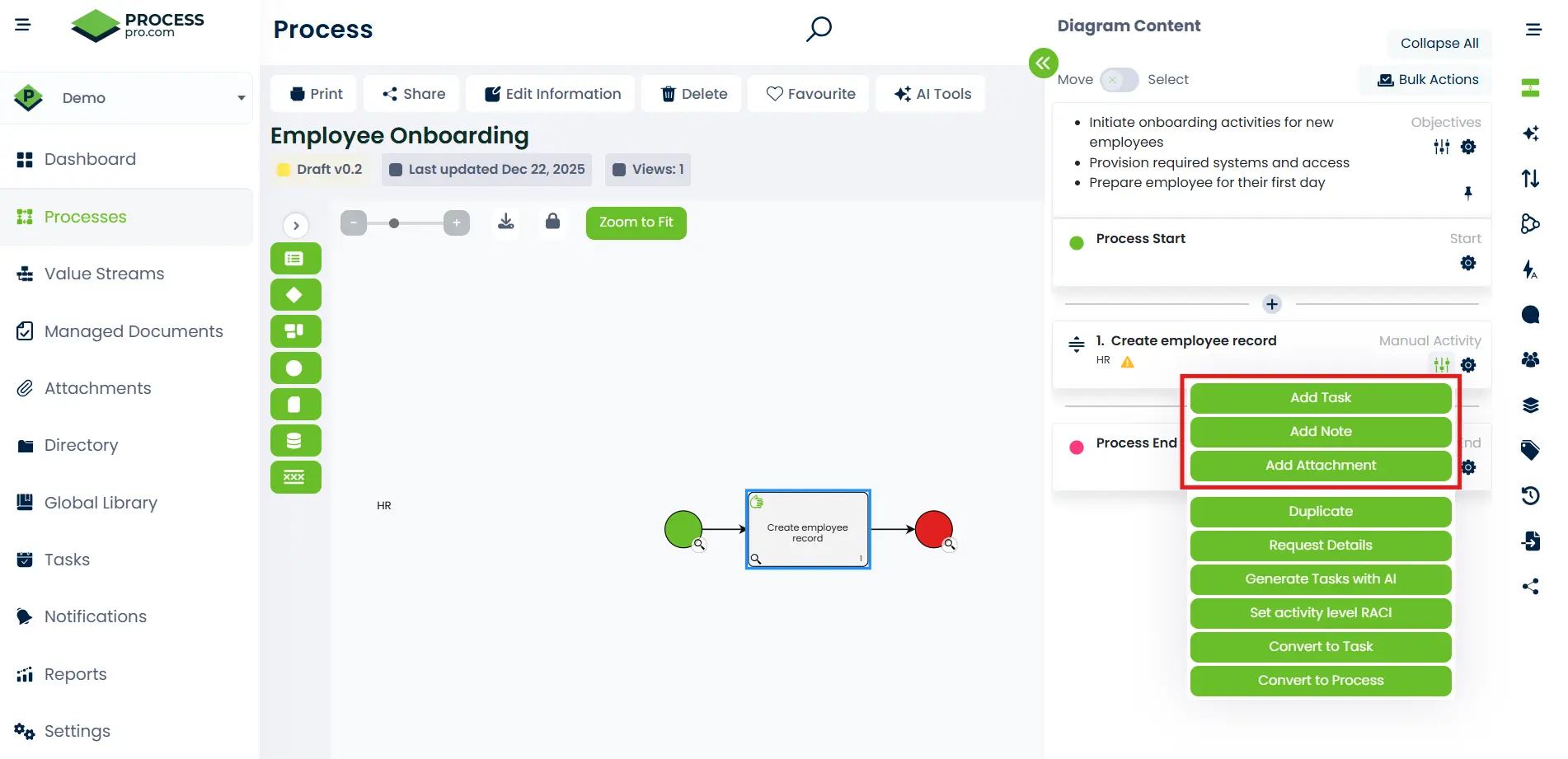
Activities can include:
- Tasks
- Notes
- Attachments
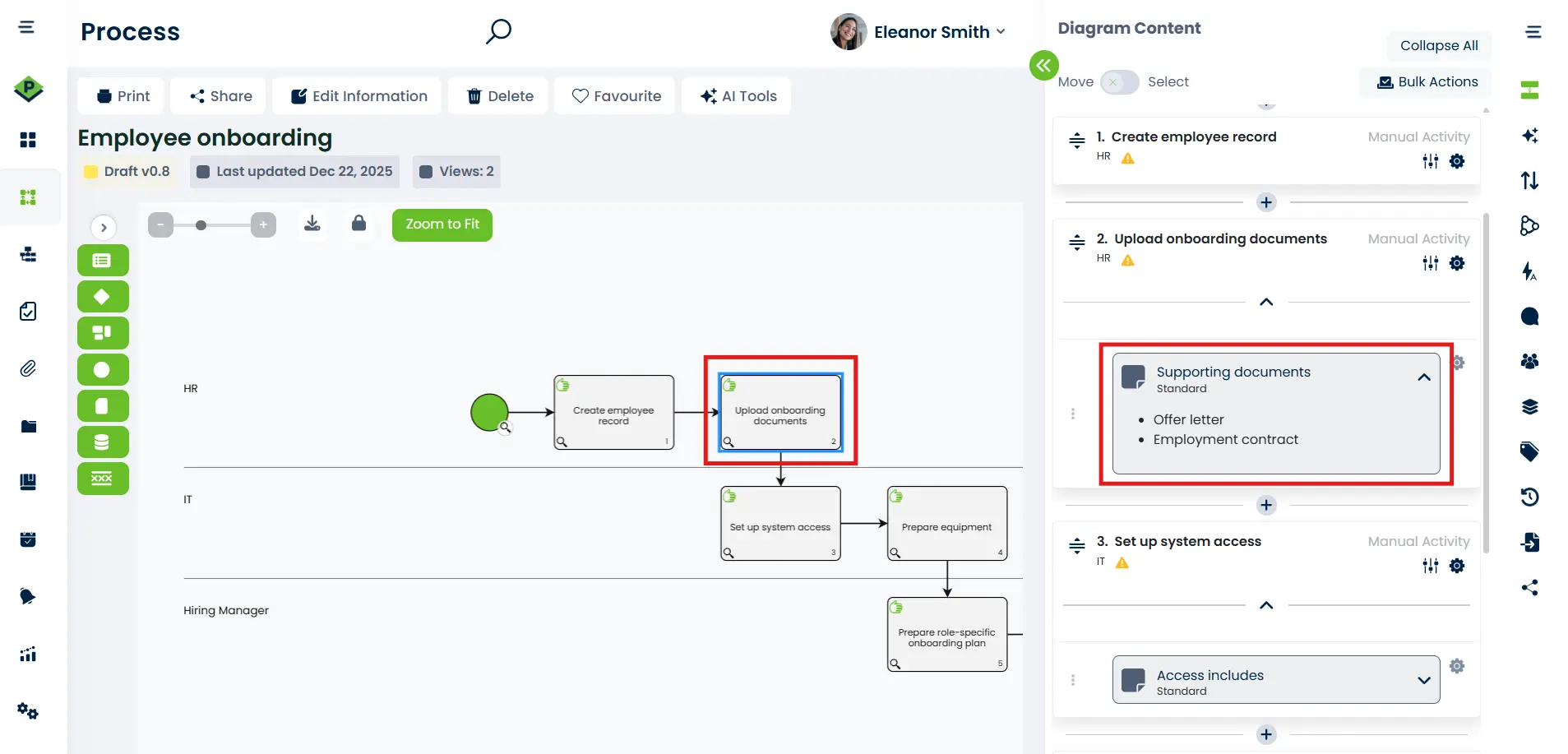
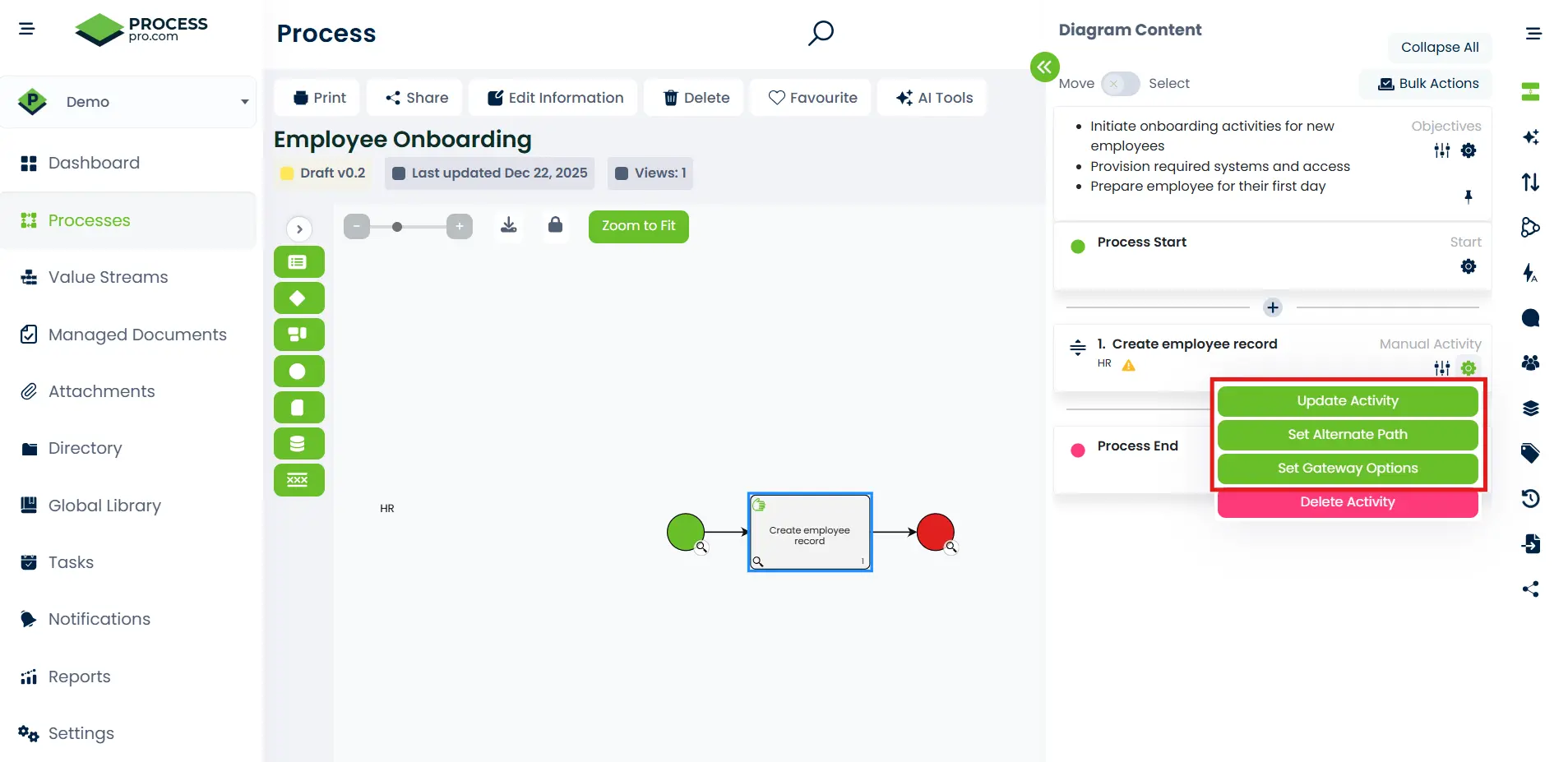
You can also:
- Configure alternate paths
- Set gateway options
4. Publish or keep as draft
Processes can be saved as:
- Draft – Work in progress
- Published – Visible and executable
- Future State – Used for planning and improvement
Publishing makes the process available for:
- Execution
- Reporting
- Automation
- Audits
Before publishing, it’s good practice to review the process for completeness, accuracy, and role ownership. Draft and Future State processes allow teams to collaborate, refine steps, and test improvements without impacting live operations.
Once published, the process becomes the single source of truth for how work is performed. It can be executed by users, used to generate tasks and workflows, referenced during audits, and reported on to track performance, compliance, and adoption across the organisation.
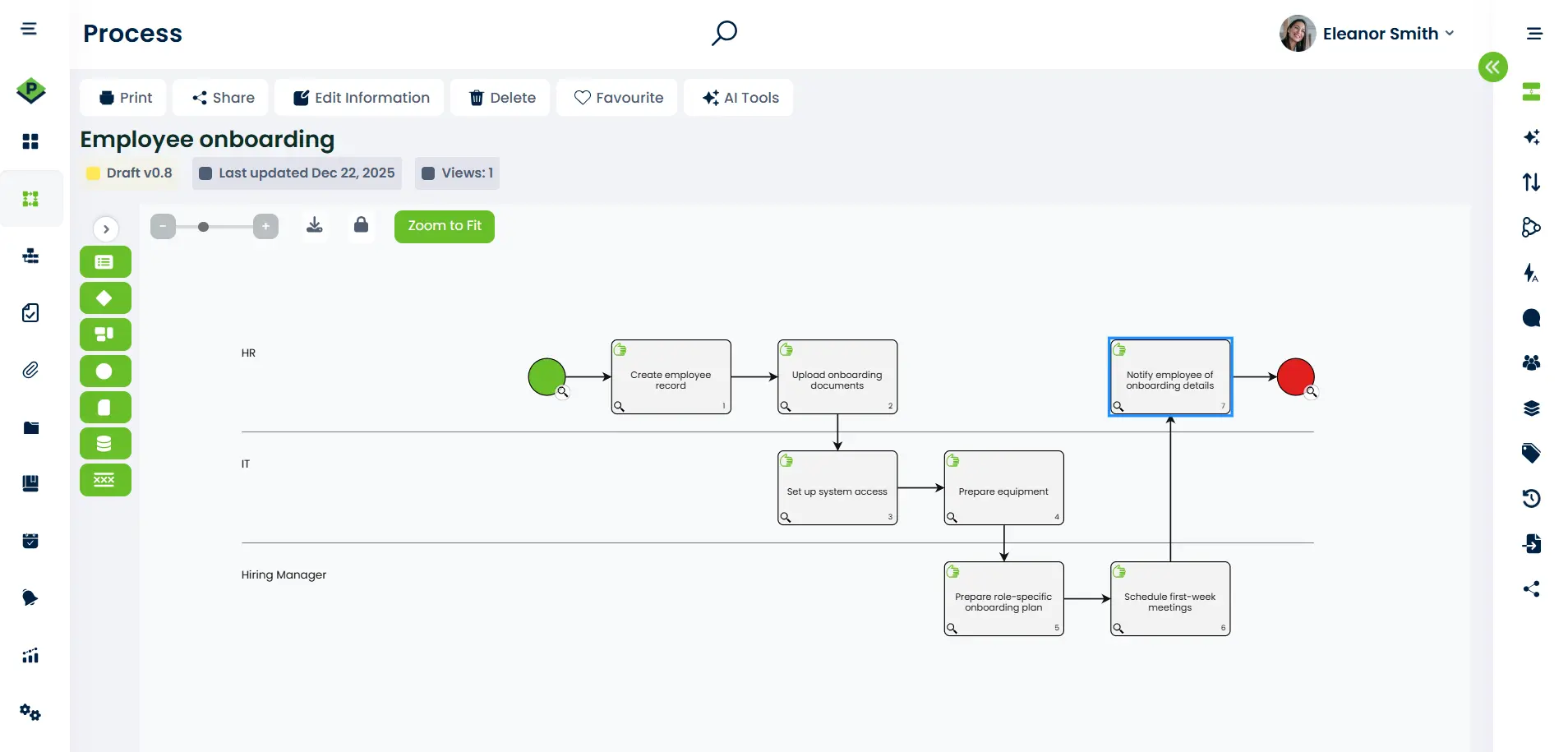
This process map shows how employee onboarding is coordinated across multiple roles, with clear hand-offs between HR, IT, and the Hiring Manager. Each activity is sequenced to ensure records are created, documentation is captured, systems and equipment are prepared, and role-specific onboarding is planned before the employee is formally notified. By visualising the flow in swimlanes, the process makes ownership, dependencies, and timing explicit, reducing gaps, avoiding delays, and ensuring everyone understands their responsibilities from start to finish.
To ensure processes like this are not only designed correctly but also consistently understood and maintained, ProcessPro includes structured training and enablement to support users at every stage of adoption.
Training and enablement with ProcessPro
ProcessPro offers a process mapping training platform designed to help users adopt the system confidently and consistently, regardless of their role.
Training is structured into guided learning pathways, allowing users to progress from foundational knowledge through to advanced authoring and administration skills. Each pathway combines short, practical modules with certificates to reinforce learning and track completion.
What the training covers
Users gain access to role-based training, including:
- Introduction to ProcessPro – Core concepts and navigation
- Users and ProcessPro – How roles, responsibilities, and participation work
- Author Training (Foundation and Practitioner skills) – Creating, maintaining, and improving processes
- Seven Habits of Effective Process Authors – Best practices for scalable, usable process design
- Administrator Training – Configuration, governance, and platform management
- Integration and SmartFlow (AI) – Using automation and AI-assisted process creation
Role-based learning
Training is tailored to different user types, including:
- Authors
- Administrators
- Consultants and advanced users
This ensures each user only learns what is relevant to how they interact with the platform.
Certification and progress tracking
As users complete modules, their progress is tracked within the platform, with certificates issued for completed courses and pathways. This supports:
- Consistent onboarding
- Internal capability building
- Governance and audit readiness
Ongoing support
In addition to structured courses, the training catalogue provides ongoing learning options so teams can deepen their knowledge as their use of ProcessPro evolves.
Process mapping best practices
Start with a high-level flow, then add detail
Begin by capturing the main stages of the process to establish clarity and agreement, then progressively break activities down where more guidance or control is needed.Use consistent naming for activities
Start activity names with clear verbs and use the same terminology across processes so users immediately understand what action is required.Assign roles early to avoid gaps
Clearly define ownership for each activity to ensure accountability, smooth hand-offs, and no uncertainty about who is responsible at each step.Keep processes modular and reusable
Design activities and subprocesses so they can be reused across multiple processes, reducing duplication and making updates easier to manage.Capture supporting information where work happens
Attach documents, notes, risks, or controls directly to activities so guidance is available at the point of execution.Design for execution, not just documentation
A good process map should support day-to-day work, approvals, reporting, and audits, not simply describe how work could happen.
Creating processes that support execution and compliance
Creating a process in ProcessPro involves:
- Defining clear process objectives
- Designing a logical, end-to-end flow
- Assigning roles and ownership
- Enhancing activities with documents, risks, and automation
- Publishing processes for use across the organisation
Process mapping in ProcessPro is not just about documenting steps, but about creating a shared, governed way of working across the organisation. By defining clear objectives, structuring activities, assigning ownership, and enriching processes with documents and controls, teams can ensure work is performed consistently and transparently. Combined with publishing, training, and ongoing improvement, ProcessPro enables processes to move from static diagrams to living assets that support execution, compliance, and continuous improvement.
When processes are clearly defined, owned, and supported by training, organisations begin to realise the full benefits of process mapping, including improved consistency, accountability, and audit readiness.
Frequently Asked Questions
These frequently asked questions address common considerations when creating, managing, and maintaining processes in ProcessPro.
What is a process in ProcessPro?
A process is a structured workflow that documents how work is performed, including activities, roles, documents, risks, controls, and automation.
Can processes be updated after publishing?
Yes. Published processes can be updated and versioned, or converted into future state processes to support continuous improvement without losing historical context.
What is the difference between current state and future state processes?
Current state processes represent how work is performed today, while future state processes are used to design, test, and plan improved ways of working.
How does ProcessPro support collaboration across roles and teams?
ProcessPro uses role-based ownership, swimlanes, and clear activity assignments to make responsibilities, hand-offs, and dependencies visible across the organisation.
What training is available to help teams use ProcessPro effectively?
ProcessPro provides role-based training pathways covering authors, administrators, and advanced users, with guided modules, certifications, and progress tracking to support consistent adoption and governance.
Ready to see ProcessPro in action?
If you want to understand how structured process mapping, role-based ownership, and governance work together in practice, a guided demo is the best place to start. We’ll walk through real process examples, show how teams use ProcessPro day to day, and answer any questions based on your organisation’s context.
James has worked with organisations across regulated and operationally complex environments to implement governed process management at scale.

James Ross
Founder and CEO. James is passionate about all thing process mapping and sharing his wealth of experience with his valued clients. He works closely with his teams to ensure that ProcessPro solves real everyday process mapping problems.
Share this article