Powered by SmartFlow AI
AI process mapping that actually works for your team
Upload a document or describe your process — SmartFlow drafts a structured, governed process map in minutes. Your team reviews, approves, and publishes. No consultants. No blank-page paralysis.
Free 30-day trial · No credit card required · Set up in under a day
Trusted by teams at
Johnson & Johnson | Wizz Air | Valley Bank | University of Otago | Brookville | Harris County Dept. of Education
What is AI process mapping?
Process mapping, done by AI — governed by your team
Process mapping documents how work gets done — step by step, with clear owners and decision points. Traditionally that meant workshops, consultants, and weeks of effort to produce diagrams that were outdated before anyone used them.
AI process mapping cuts that to minutes. Upload an existing document, or give SmartFlow a process title and objectives — it drafts the structured map. Your team reviews, approves, and publishes. Done.
The difference from a diagramming tool is what happens after. Visio gives you a picture. ProcessPro gives you a living process — owned, versioned, and audit-ready from day one.
10×
faster than a traditional process mapping workshop
100%
of maps have an assigned owner from day one
0
consultants or IT involvement needed to get started
Watch how teams go from a document upload to a governed, published process map.
Ops consistency
Audit readiness
Compliance documentation
Onboarding processes
SOP creation
ISO 9001 support
See SmartFlow in 2 minutes
How it works
From document to live process map in three steps
Two ways to get started — upload an existing document or describe the process from scratch. Either way, SmartFlow handles the structure and your team governs the result.
STep 01
Upload a document or describe your process
Upload an existing file (PDF, Word, PowerPoint, and more) and SmartFlow builds the process from it — or provide a process title and objectives and let AI explore how the process might take shape.
STep 02
SmartFlow generates the structured map
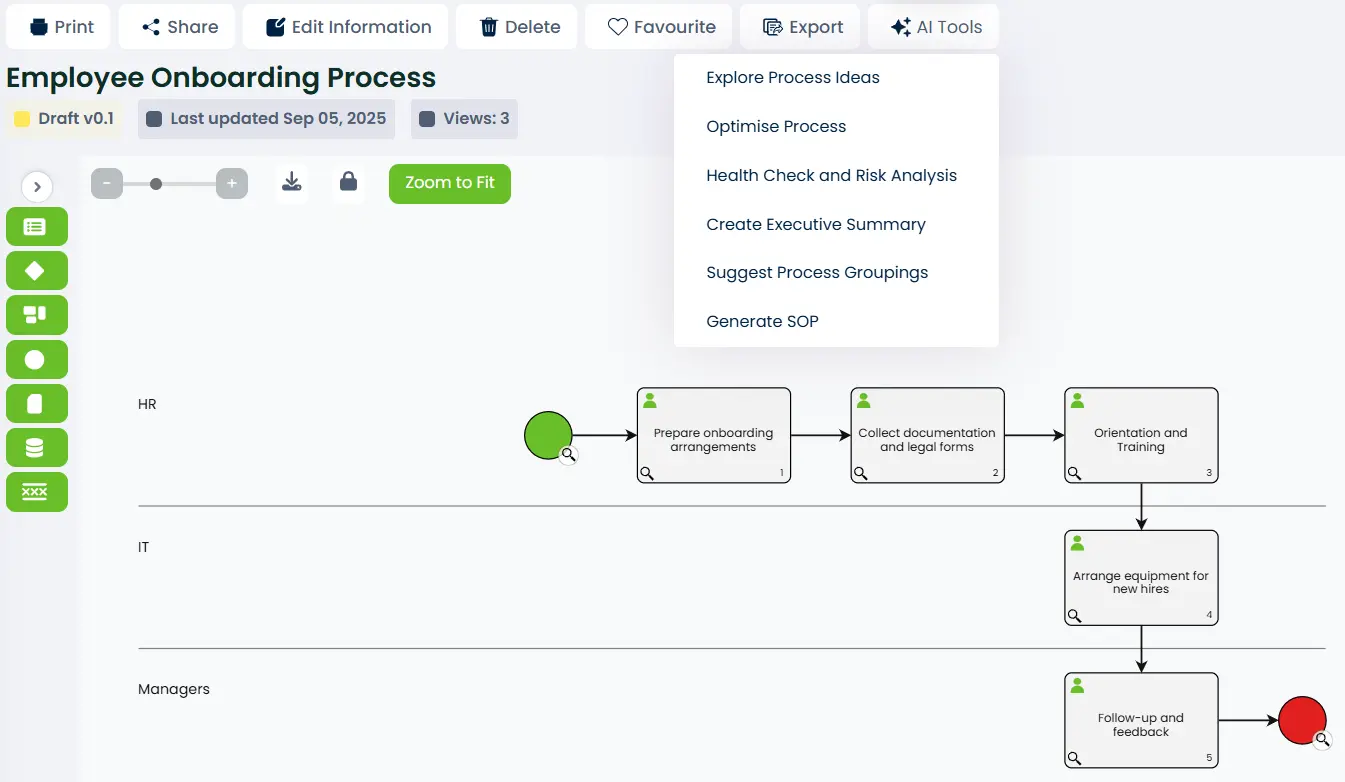
AI creates the process with activities, tasks, roles, triggers, inputs, and outputs. It appears directly on the process map or in the import panel for you to drag and drop — your choice.
STep 03
Review, refine, approve, and publish
Your team edits the draft, assigns owners, and triggers the approval workflow before anything goes live. Full version history and audit trail are recorded from the first save.
Features
Everything built into one platform
Not just AI generation — the full governance layer that makes maps usable long-term.
Create from a document or objectives
Upload an existing file or provide a title and objectives. SmartFlow generates a full process — activities, tasks, roles, triggers, inputs, and outputs — ready to review.
Optimise existing processes
Apply SmartFlow to any existing process map. AI suggests where steps can be streamlined, merged, or simplified — continuous improvement built into the platform.
Health check and risk analysis
AI checks for missing triggers, unassigned roles, bottlenecks, circular dependencies, and structural gaps — and suggests specific improvements to fix them.
Executive summary generation
Generate a concise 4–5 sentence executive summary of any process, value stream, or managed document — written for business and leadership audiences.
Suggest process groupings
AI recommends logical groupings of activities into phases or subprocesses — helping large or complex processes stay organised and easy to navigate.
Generate SOP in one click
SmartFlow generates a formal SOP document — Purpose, Scope, Responsibilities, and Procedure Steps — directly from your process map, exported as a PDF.
The difference
Replace the chaos with one system
Most teams document processes in scattered tools that nobody trusts. Here’s what changes with ProcessPro.
WITHOUT PROCESSPRO
- Processes scattered across Word docs, PDFs, and shared drives
- Hours spent in workshops to map a single process from scratch
- No version control — nobody knows which document is current
- Audit prep means scrambling to locate approvals and change records
- No way to check if processes have missing roles, gaps, or bottlenecks
With ProcessPro SmartFlow
- One governed system — every process findable, versioned, and owned
- Upload a document or provide objectives — AI generates the process map
- Full version history with approval records on every published change
- SOP generated from any process map in one click — PDF, ready to use
- AI health check identifies missing roles, gaps, and bottlenecks automatically
Customer stories
Teams who replaced the chaos
“ProcessPro helped us turn tribal knowledge into standardized processes, giving our teams a common language to work more efficiently across departments. Their commitment to continuous improvement makes the platform even more valuable over time.”
“Instead of resisting change, people embraced it — because they could see it working. We’re already seeing cleaner workflows, faster communication, and a shared drive to keep improving.”
FAQ
Common questions about AI process mapping
What is AI process mapping?
AI process mapping uses artificial intelligence to turn unstructured inputs — documents, titles, objectives — into structured, step-by-step process maps. ProcessPro’s SmartFlow offers two ways to create a process: upload an existing document (PDF, Word, PowerPoint, and more) and let AI build the process from it, or provide a process title and objectives and let AI explore how the process might take shape. Either way, your team reviews and refines the output before anything is published.
Does SmartFlow only create processes, or can it improve existing ones?
Both. SmartFlow offers six AI-powered tools: create a process from a document or from a title and objectives; optimise an existing process by suggesting steps to streamline, merge, or simplify; run a health check to identify missing triggers, unassigned roles, and structural gaps; generate an executive summary; suggest logical groupings for activities; and generate a formal SOP document in PDF format. All suggestions appear in the SmartFlow tab for your team to review — nothing is applied automatically.
What file types can I upload to create a process?
SmartFlow accepts a wide range of file types including .pdf, .docx, .pptx, .txt, .html, .md, .json, .csv and common code file formats. The uploaded file is not stored by ProcessPro — it is used only to generate the process and then discarded. If a document contains minimal content and AI cannot identify a process, a warning will appear so you can try again with a more detailed file.
Is this just a diagramming tool like Lucidchart or Visio?
No. Diagramming tools create visuals but don’t govern them. ProcessPro manages the full lifecycle of every process — with assigned owners and roles, version control, approval workflows, audit trails, and linked managed documents. SmartFlow accelerates the creation of processes, but the platform ensures they stay accurate, owned, and compliant long after the first draft.
Who can use SmartFlow, and does it require a special plan?
SmartFlow is available to administrators and stakeholders on companies that have the Allow AI Generation permission enabled. Administrators can also set company-level rules to control what AI is permitted to generate — including whether it can create roles, glossary terms, and notes. This gives your organisation full control over how AI is used within your process environment.
Map your first process with AI today
Free 30-day trial. No credit card. Start with a document upload or a process title — your first SmartFlow map in minutes.
No credit card required · 30-day free trial · Cancel anytime