
Features › Activities
Process mapping activities
Define each step and who is responsible
Give your team a clear view of what needs to happen, who carries out the work and how to complete it.
Activities represent the individual steps in your processes and value streams. In ProcessPro, you can assign a responsible role, identify the type of work and add supporting instructions to each activity.
Turn a process map into practical guidance
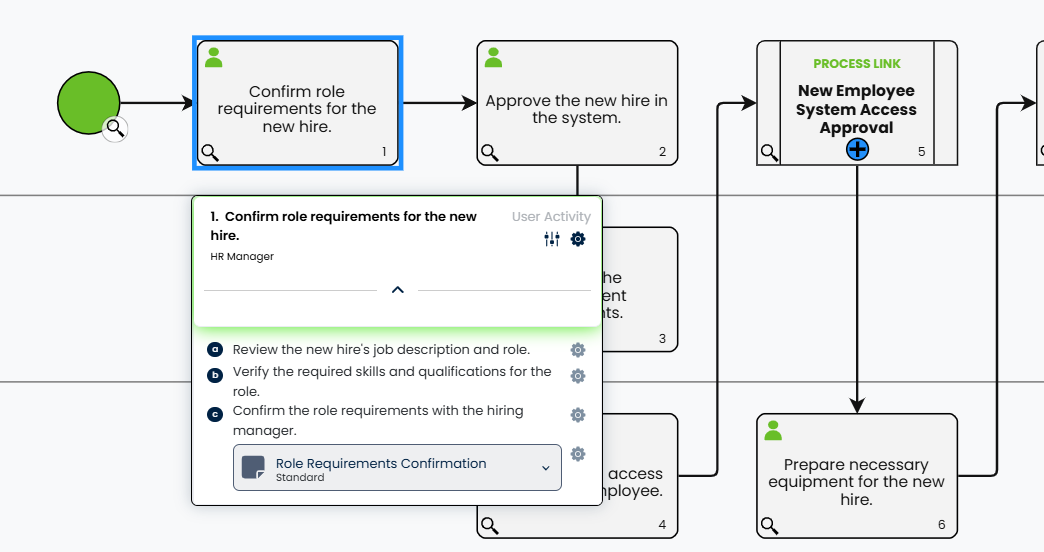
A step on a process map can tell someone what needs to happen without explaining what to check, which instructions to follow or what to do when something is wrong.
In ProcessPro, you can bring tasks, notes and attachments together at the relevant activity. The person doing the work can find that detail where they need it, with less need to search elsewhere or ask a colleague to explain the step.
Make responsibility visible
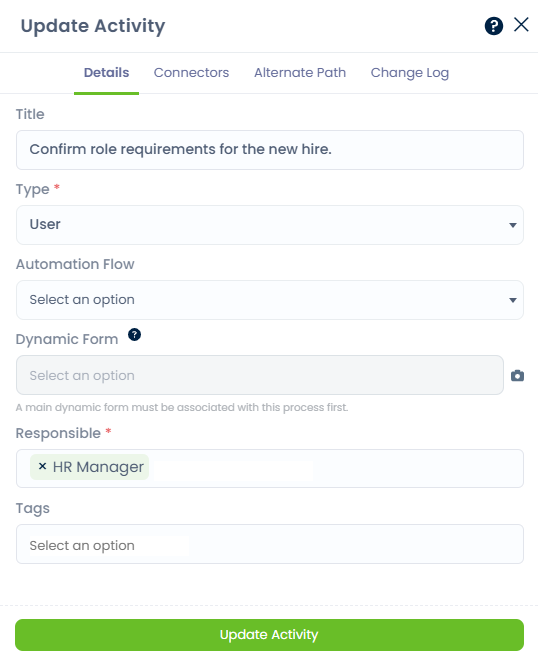
Assign a responsible role to each activity so people can see who carries out that part of the process and where responsibility passes to another role.
In employee onboarding and induction, the HR Manager handles “Confirm role requirements for the new hire”, while IT Support handles “Prepare necessary equipment for the new hire”. Showing these assignments helps each team see its part in preparing the employee to start.
Show the type of work involved
Use five activity types to distinguish between work performed by people, approval steps and system actions. Visual indicators help people recognise each type on the map.
User activity
Show a step performed by a person, such as confirming the role requirements for a new hire.
Manual activity
Identify work completed manually, such as setting up a new employee’s workstation.
Approval activity
Highlight where internal approval is required, such as approving a new employee’s system access. These steps are separate from approval to publish a process.
Automated activity
Show a step performed automatically by a system, such as an HR system sending a new employee’s welcome email.
Database update activity
Identify a step that updates a database, such as updating a new employee’s record in an HR system.
These types describe the work represented on your map. Selecting a type does not, by itself, automate or execute the activity.
Keep the details with the step
Give people the information they need to carry out an activity without overcrowding the process map. Someone covering unfamiliar work can refer to the checks and guidance recorded with the step.
Tasks
Break the activity into smaller actions and checks so people know what completing the step involves.
Notes
Explain exceptions, warnings and special cases so people have guidance when the usual approach does not apply.
Attachments
Keep supporting documents, images and videos with the activity so people can open the relevant material while following the process.
EXAMPLE
For example, “Confirm role requirements for the new hire” could include tasks to review the job description, verify required skills and confirm requirements with the hiring manager. A note could explain how to resolve unclear requirements, with supporting role guidance attached. This gives the HR Manager the checks and information needed before onboarding continues.
Add guidance directly to each activity
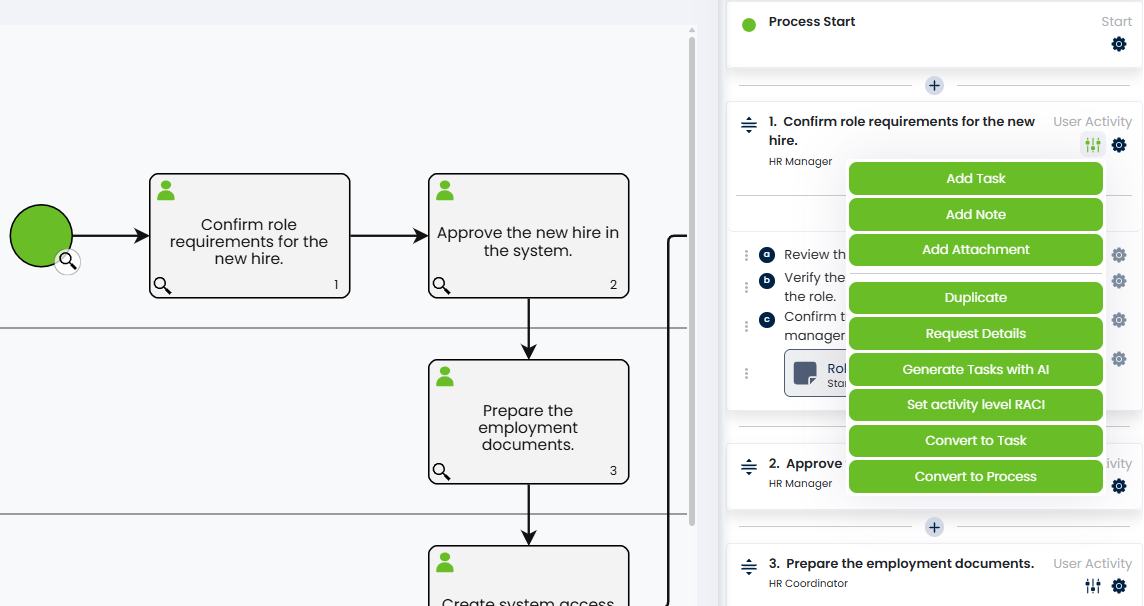
Add tasks, notes and attachments from the activity menu, so the people following your process can find supporting information at the step where they need it.
Manage changes to the way work gets done
Activities sit within processes that your team can maintain as people, responsibilities and working methods change.
With ProcessPro’s role-based system, you can update who holds a role without reassigning each process activity when someone changes position.
Use Publish with Approval to have changes to process steps and instructions checked before publication.
Refer to process history when you need to review an earlier version and understand how the process has changed.
Make each step easier to follow
Bring responsibilities, tasks and supporting guidance together in ProcessPro, so your team can understand what each step involves and how to carry it out.