
The three main types of business processes are operational, supporting and management. Operational processes deliver products or services to customers. Supporting processes help teams carry out that work. Management processes set direction, monitor performance and guide improvement.
For example, fulfilling a customer order is an operational process, running payroll is a supporting process, and setting budgets is a management process. This guide explains each type, with examples of how they connect across departments.
TL;DR - Types of business processes
Every business runs on three main types of processes: operational, supporting, and management.
Operational processes create customer value and generate revenue.
Supporting processes keep internal operations running smoothly.
Management processes plan, monitor, and improve how the business performs.
Understanding these types helps you spot inefficiencies, fix weak points, and improve collaboration. With a tool like ProcessPro, you can map, manage, and optimize all three in one place, cutting errors, improving speed, and helping you scale without losing control. If you are weighing up options, compare the best process management software for operations and compliance teams.
What are business processes and why they matter
A business process is a set of steps your company follows to reach a goal, which can be simple or complex and often involves multiple teams working together.
Business processes turn inputs like time, money, materials, or information into outputs such as products or services.
Some examples:
- Hiring a new employee
- Approving an invoice
- Delivering a product to a customer
Clear processes keep work the same every time. Everyone knows what to do and who is responsible. This shared clarity shows how steps connect across the business.
This approach cuts mistakes, speeds up work, and improves results.
Operations managers use tools to document and manage processes in one place, replacing scattered spreadsheets and endless email threads with a single source of truth.
This reveals hidden problems before they impact your products or services.

Understanding the types of business processes
Understanding the types of business processes helps you work better by showing what drives value, what supports it, and what keeps things on track. Without this clarity, teams work in isolation, waste time, and miss opportunities to improve.
Here’s what changes when you know your process types:
Spot gaps and delays fast to make problems easy to see.
Cut steps that don’t add value to save money.
Make fewer mistakes with clear steps that guide everyone.
Decide faster with clear roles and stay compliant with better tracking.
Find opportunities to improve efficiency by mapping steps.
Work together better by making everyone’s role visible.
- Process maps help operations managers and leaders understand how work moves between teams and who is responsible at each stage.
Benchmark your types of business processes against industry standards.
Knowing the three process types gives you a clear framework, but managing them in real life is where complexity starts. Operational, supporting, and management processes often sit across different teams, tools, and owners. Without one structured system, it becomes difficult to maintain consistency, track accountability, and improve processes without creating confusion somewhere else.
Types of business processes: The 3 core categories explained with examples
All organizations need three main types of business processes. These are operational, supporting, and management.
They give you a clear framework to set standards, find weak spots, and plan fixes.
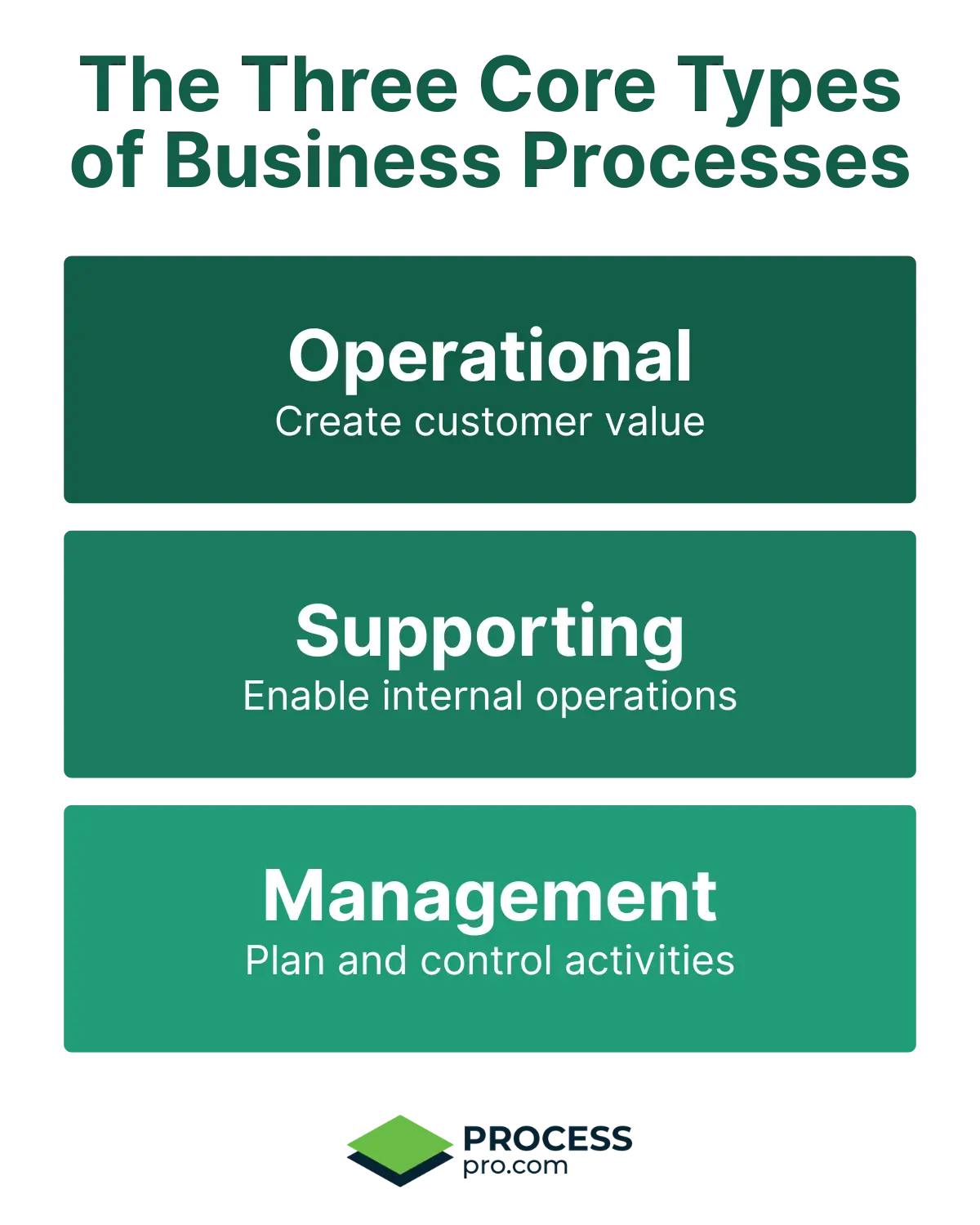
The three types cover all business activities. Operational processes create customer value. Supporting processes keep internal work running. Management processes guide performance, oversight, and improvement. This keeps you aligned with goals.
At a glance: The three core types of business processes
Here’s a quick overview of how each process type contributes to business performance.
Classify a process by what it does, rather than by its department. Marketing and customer service processes can be operational when they directly contribute to acquiring or serving customers. They can be supporting when they enable other processes. A department can also carry out management processes, such as setting budgets and reviewing performance.
| Type | Focus | Key Examples | Pro Tip Snippet |
|---|---|---|---|
| Operational | Create direct customer value and revenue | Making products/services, Marketing/selling, Delivering to customers, After-sales support | Track output, turnaround time and errors. Set targets based on customer requirements, the risks involved and your current performance. |
| Supporting | Enable internal operations and teams | Payroll/employee tasks, IT support/maintenance, Buying supplies/facilities, Finance reports/compliance | Agree service standards with the teams using the process. For payroll, track whether employees are paid accurately and by the required payment date. |
| Management | Plan, measure, and guide overall activities | Planning strategy/budgets, Tracking sales/performance, Managing risk/compliance, Running improvement projects | Set clear objectives, choose relevant performance measures and assign responsibility for reviewing results and following up on decisions. |
Use a RACI matrix to clarify who carries out the work, who is accountable for it, who provides advice and who needs updates. RACI describes responsibilities within a process. A process map shows its steps and handoffs.
Operational processes
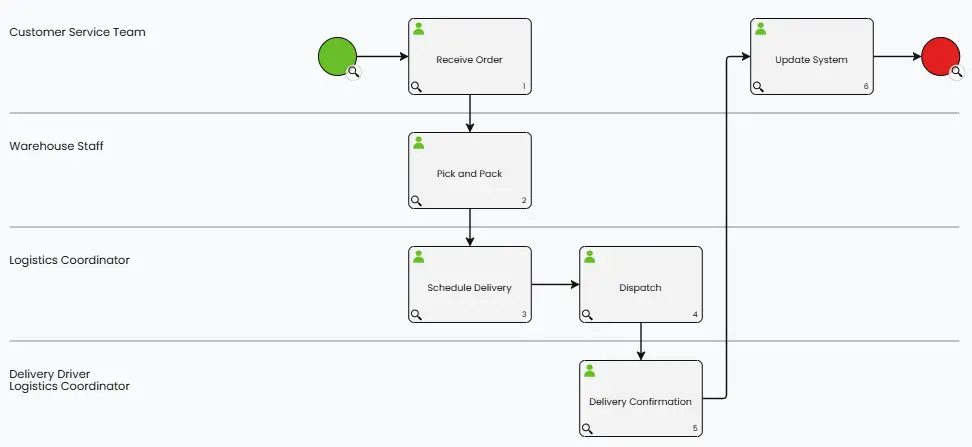
Operational processes, also called core processes, create value for customers, bring in money, and form the backbone of your value chain. Examples include making products or services, marketing and selling, delivering to customers, and giving after-sales support.
Measure how much work the process completes, how long it takes and how often errors occur. Use these measures to identify delays and set standards that reflect your customer requirements and the consequences of an error.
Delivering to customers: operational process example
Supporting processes
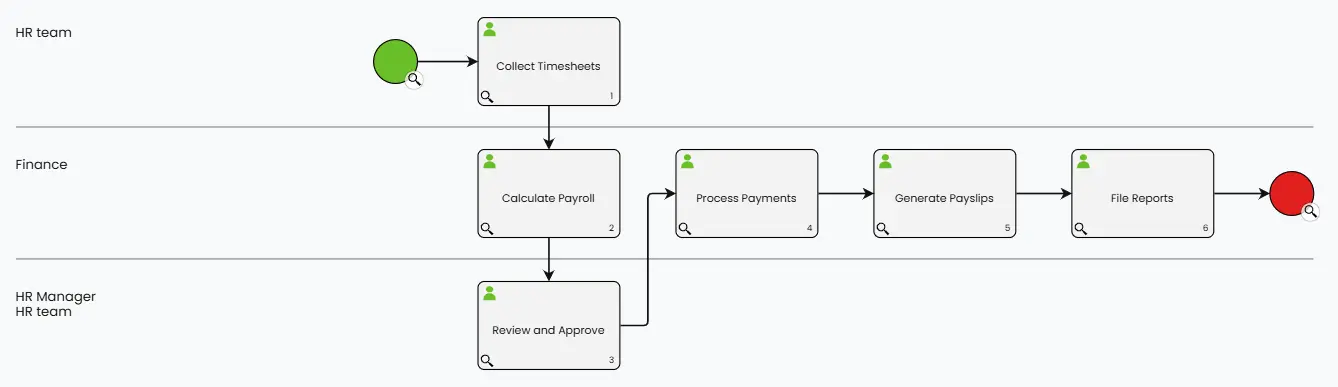
Supporting processes don’t make money directly, but they make operational processes work and serve internal teams, not customers. Examples include payroll and employee tasks, IT support and maintenance, buying supplies and managing facilities, and finance reports and compliance.
HR doesn’t sell products, but without hiring the right people, sales and production can’t work. Supporting processes keep your engine running.
You can standardize these processes using clear steps, manage requests easily, and track approvals so operations keep moving.
For supporting processes such as HR or IT, agree service standards with the teams that depend on them. Define response times, responsibilities and escalation steps. For payroll, check that payments are accurate and completed by the required payment date.
Payroll and employee tasks: supporting process example
Management processes
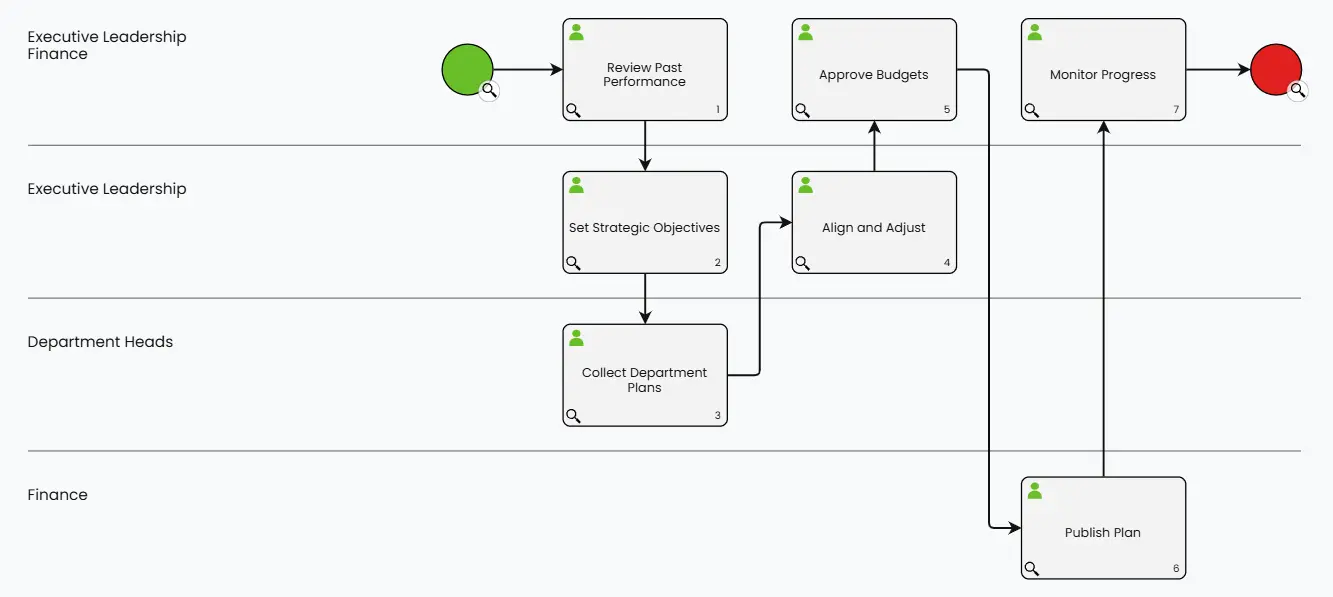
Management processes guide and control other activities by focusing on planning, measuring, and improving how your business runs. Examples include planning strategy and budgets, tracking sales and performance, managing risk and compliance, and running improvement projects.
These don’t make money directly but keep everything aligned with your goals. Strong management processes also help you adapt, use resources well, and stay compliant.
Document how performance is reviewed, who makes decisions and how agreed actions are followed up. Use relevant measures and review records to identify where changes are needed.
Objectives and Key Results, or OKRs, are one way to connect goals with measurable outcomes. Choose measures that suit the process and agree how often to review them. Record who is responsible for following up on decisions.
Planning strategy and budgets: management process example
On paper, these categories look simple. In practice, they overlap across departments, rely on handoffs, and change over time. That is where businesses start losing control. One team updates a process, another keeps following the old version, and leaders still do not have a clear view of what is actually happening across the operation.
Turn business processes into predictable outcomes
Get the five-step Process Management Playbook to help you visualise, standardise, govern, automate and continuously improve your processes.
Each step includes a practical example and an interactive demo showing how it works in ProcessPro.
How to create operational processes for a company
Knowing the types of business processes is step one, and step two is putting clear operational processes in place. Strong processes keep work consistent, improving quality, speed, and reliability. Follow these steps to create them for your company:
1. Find core activities
List what creates value for customers, such as making products, delivering services, and marketing or sales.
2. Map the steps
Write out each step, noting who does what, what’s needed, and what comes out. This stops confusion.
3. Write down who does what
Give each step an owner, specify who is responsible, and explain how work moves between people.
4. Set standards
Define what good looks like for each step, including timelines, accuracy levels, and approval rules. These standards keep things consistent.
5. Build it in a system
Store the process in a shared system where teams can find its steps, responsibilities and supporting documents. ProcessPro helps you map and document processes, assign ownership, manage approvals and maintain version history. Where work needs to be executed and tracked, define the workflow and reporting requirements separately.
This is where many businesses get stuck. It is one thing to define a process once. It is much harder to keep it current, assign clear ownership, manage approvals, and make sure every team is following the same version. As processes grow across departments, manual process management quickly becomes difficult to control.
6. Train everyone
Share the new process and train your team so everyone understands their role and what’s expected of them.
7. Watch and improve
Processes aren’t static; they need regular review and refinement to stay effective. Review them often to catch bottlenecks, remove unnecessary steps, and track performance over time.
Ready to map your own processes?
Use ProcessPro to create your first process map, assign responsibilities and keep every step in one controlled system.
Start your 30-day free trial with up to five users. No credit card required.
How to map your first business process
You’ve identified the different types of business processes in your organisation. The next step is to map how the work actually gets done.
A process map gives you a clear view of each step, who is responsible, and where decisions or delays occur.
Our step-by-step guide shows you how to create your first business process map in ProcessPro.
Examples of business processes across teams
The following illustrative scenarios show how processes connect departments. They describe possible approaches, rather than reported customer results.
Order-to-cash in retail
An order-to-cash process connects sales, inventory, shipping and finance. Mapping it can show who confirms an order, checks stock, arranges delivery and collects payment. The team can then identify delays and measure order completion time.
Employee onboarding in a service business
Employee onboarding is typically a supporting process involving HR, IT and the employee’s manager. A shared process can define the steps for contracts, equipment, system access and induction. Assigning responsibility and due dates helps teams track what remains outstanding.
Invoice approval in finance
Invoice approval is typically a supporting process. It defines who checks an invoice, who approves it and when it moves to payment. Clear approval rules and records help finance track outstanding invoices and investigate delays.
Customer support escalations
A customer support escalation process defines when an issue needs specialist attention, who takes responsibility and how the customer receives updates. It can be operational when resolving customer issues forms part of the service the organisation delivers.
Before changing a process, record its current performance. After the change, compare turnaround time, errors or another relevant measure over a suitable period. Use the results to assess whether the change helped.
Related business functions
Linking types of business processes to business functions makes them easier to understand. Every function uses operational, supporting, and management processes.
Sales (Operational)
Sales processes help generate revenue through lead qualification, proposals, follow-ups and closing deals.
Customer service
Customer service processes can be operational when they directly deliver customer support, resolve complaints or provide after-sales service. Internal activities that help the service team work, such as maintaining its systems, are supporting processes.
Finance (Supporting + Management)
Finance supports operations through invoicing and payroll, while also handling management processes like budgeting, financial reporting, and compliance monitoring.
Operations
Operations processes organise how products or services are delivered. Examples include production scheduling, order fulfilment and delivery. Purchasing materials used in production can form part of this operational flow. Purchasing office supplies usually supports internal work. Classify each process according to its purpose.
Production (Operational)
Manufacturing or creating products is a key operational process that directly creates customer value.
Marketing
Marketing processes can be operational when they directly contribute to attracting customers and generating sales. Activities that provide internal resources or support other teams can be supporting processes. Setting marketing budgets and reviewing performance are management processes.
Human Resources (Supporting)
HR supports all functions through hiring, onboarding, payroll, training, and employee engagement processes.
Management (Management)
Strategic planning, performance monitoring, goal setting, and process improvement fall under management processes across all departments.
You can map all functions and their processes in one system. This makes handoffs clear, shows weak spots, and reveals where improvements help most.
Map the handoffs between functions as well as the steps within each process. For example, define how marketing passes enquiries to sales and who takes responsibility for following them up.
Key takeaways
Operational processes deliver customer value. Supporting processes provide the resources needed to carry out that work. Management processes set direction and oversee performance.
Classify each process by its purpose, then map its steps, responsibilities and handoffs. Keep the documentation current and use relevant measures to assess whether changes improve the work.
Frequently asked questions
Your quick reference for understanding the types of business processes basics.
What are the main types of business processes?
This article uses three main categories: operational, supporting and management.
Operational processes deliver products or services to customers. Supporting processes provide the people, systems and resources needed to carry out that work. Management processes set direction, monitor performance and guide improvement.
Classification depends on the purpose of the process, rather than the department responsible for it.
What are examples of the different types of business processes?
Operational: product development, marketing, sales, order fulfillment, customer support
Supporting: payroll, IT support, procurement, facilities management, finance reporting
Management: budgeting, performance tracking, risk management, strategic planning
These examples show how process types work together. They keep your business running well.
How do you create operational types of business processes?
To create operational processes:
- Find the key activities that deliver value to customers.
- Map each step clearly. Show roles and responsibilities.
- Set quality standards for outputs.
- Use a process management tool to organize everything in one place.
- Check and improve the process often to keep it working well.
What are the 4 types of business processes?
There is no single classification used by every organisation. A four-category approach separates operational, supporting, management and strategic processes.
In that approach, strategic processes cover long-term direction, such as deciding which markets to serve or which capabilities to develop. Management processes cover planning, oversight and performance.
This article uses three categories and includes strategic planning within management processes. Use a consistent classification that helps your organisation understand how its processes connect.
Manage your business processes in one place
Once you have identified your process types, document how the work happens and who is responsible. Give each process an owner and establish how changes are reviewed, approved and shared.
ProcessPro helps you map and document processes, assign ownership, manage approvals and maintain version history.
Start your 30-day free trial with up to five users. No credit card required.

James Ross
James Ross is the CEO of ProcessPro. He works with organisations to make their processes easier to manage, review and improve. His focus is on giving teams clear ownership of their processes and a reliable way to keep them up to date.
Share this article